Sunday, March 9, 2014

Docs: JournalFS and TokenFS classes.

I released a chunk of Arduino code this week, and one of the classes is a "journalling" (or "log-structured") filesystem for extremely small Flash/EEPROM storage, using absolutely minimal resources, in about three hundred lines of code.

Compiled size is about 660 bytes for an instance of TokenFS. The virtual memory classes add about 930 bytes more, if you're starting from naught, but I think that includes EEPROM.h and some other system dependencies too.

When I say 'extremely small', I mean the 1024 bytes of EEPROM in the Atmega32U4 inside the Arduino. One kilobyte of storage, total. That's smaller than the minimum block size of many other filesystems.

The primary job of such a filesystem is to reduce degradation of the storage, by smoothing out the write access pattern so damage is spread evenly over the whole chip, and not concentrated in a few 'hot blocks'. Flash storage is generally guaranteed 10,000 'write cycles' before media errors start to occur. That's per byte location, so the perfect ideal is to have every byte on the storage written 9,999 times before you have to tick over the 10K odometer on any of them.

It's like having a blackboard, but where the eraser is made from sandpaper. It works - but not forever.

One nice thing: the Atmel AVR's EEPROM (and program flash on some variants) is 'hardened' to endure 100K write cycles, which partly makes up for the tiny size.

JournalFS

  • Levelled write distribution over entire storage.
  • Resistant to corruption, power fails, and zero space issues.
  • Guaranteed success if volume free space equals or exceeds block size.
  • Minimal RAM use - head and tail pointer state only. (a dozen bytes)
  • Performs automatic incremental and 'emergency' defragmenting.
  • Basic journal - only understands blocks
  • 256 bytes per block maximum (currently) 
  • 5 bytes per block overhead, 100% storage utilization. 
  • 64K storage size limit.
  • Storage is scanned/checked on mount, twice.
  • Tested on AVR Arduinos, but should work on SAM machines as well.
  • Virtual Memory classes mean filesystems can be stored in RAM, EEPROM, Program Flash (read only currently), or user-defined storage like SD cards.


Built on top of the base class is what most people think of as a 'filesystem', which is an indexed catalog of things in the storage. In this case, a single byte 'token' key is used instead of a filename string.

TokenFS

  • Adds 'byte token' index on top of JournalFS. 
  • Index size passed as instance parameter - maximum 256 'entries'.
  • Moderate RAM use: the index requires one word (two bytes) per entry. (max 512 bytes)
  • Writing data block for a key replaces existing data.
  • Writing empty blocks for a key is equivalent to 'file deletion'
  • Guaranteed success if replacement block is same size or smaller than previous version.
  • No practical difference between 'missing entries' and 'zero length files' - all keys return a result.
  • Test cases wrote 200,000,000 random 'file updates' to a 1K RAMDrive without unexpected data loss - exceeding Flash hardware reliability by 1,000 times.
What's the difference? JournalFS takes care of the utterly 'low' level details, but tries not to worry too much about what it's storing. By itself it would be perfect for diary-like 'logfiles' where you just append another record every once in a while, and throw away the oldest to make room.

TokenFS assumes the first byte stored in each block is a 'token key', and maintains an in-RAM index of all the keys it finds. The index is a catalog of pointers to the storage location where the 'latest' version of that key is kept. This is kind of like the logfile, but instead of throwing away the global oldest, it's smarter about throwing away obsolete blocks for individual keys.

TokenFS is the exemplar for how to extend JournalFS by overriding block_state(), which is how JournalFS notifies descendants about blocks found, and asks if they are still valid. 

I need to make it very clear that this "Filesystem" will not scale. It is not intended for large storage devices. The primary issue is the need to scan the filesystem on mount to 'catch up' with the journal - which means reading the headers of all the blocks in storage. When you have a ridiculously small amount of storage, that's fine. If you have megabytes, that time becomes significant.

But if you need to store a bunch of 'configuration options' in an Arduino that are independent of the program flash, this is the way.

Usage

Loading the library and defining some storage is pretty easy. This is how the RAMDrive is initialized in the filesystem test.

  #include <unorthodox.h>      // include the library, of course
  
  byte storage[1024];          // create a 1024 byte buffer
  MemoryPage store(storage);   // wrap it in a virtual page
  TokenFS fs(&store,1024,192); // 192-entry tokenfs 

In most cases you'll be using EEPROM, which is even simpler.

  #include <EEPROM.h>          // do this first
  #include <unorthodox.h>      // to switch on more stuff in here
  
  EEPROMPage eeprom(0);                   // wrap EEPROM in a virtual page
  TokenFS fs(&eeprom, 1024, entries);     // start the token index

If you wanted to use only a portion (say, leaving the first 128 bytes free) you can do so:

  EEPROMPage eeprom(128);                 // start at byte 128
  TokenFS fs(&eeprom, 1024-128, entries); // use until the end

Writing TokenFS entries is currently a little clumsy, for various reasons. To avoid re-packing the block later, we prepend the token byte ourselves. (It has been a challenge making it 'seem right' but also have good performance.)


  byte block[size+1];
  // manually prepend the token byte
  block[0] = token;
  // fill the rest of the block with data:
  // ....
  // wrap the array in virtual memory
  MemoryPage page(block);
  // write it to the filesystem
  if( fs.token_write(token, &page, size+1) ) {
     // it fit. yay!
  } else {
     // it didn't. boo!
     Serial.print("\n Write Failed ");
  }
  // page is automatically freed when we leave scope

Reading entries back from TokenFS is the most straightforward, token_page() will return a virtual memory page containing the payload content, (or null) and token_size() will tell you how much of it you should read. The token byte is not included.

  int size = fs.token_size(token);
  if(size) {
    Page * page = fs.token_page(token);
    for(int i=0; i<size; i++) {
      byte b = page->read_byte(i);
      // process each byte...
    }
    // free page object
    delete page;
  }

Generally, it's a good idea to call token_size() first, because if  zero, there's no point calling token_page().  Note the Page object is allocated by the call, so delete it when you are done to avoid memory leaks. (Treat it similarly to a 'file handle'.)

If you really need speed, you can avoid instancing new virtual memory Page objects by interrogating the token index directly to get the storage offsets.

There is generally no need to 'format' a volume before use - 0x00 or 0xFF filled blocks (the most common occurrence for EEPROM) are read as 'corrupt' blocks, which indicates an empty journal. If no existing journal can be found, a new one is started from scratch. The likelihood of random data being recognized as valid blocks is very small.

The exception would be if there had previously been a filesystem installed that was similar in structure, but actually different. In that case, clearing out the EEPROM may be necessary. (Or at least the first dozen bytes)

Applications

To understand why you want all this, imagine you have ten 'options' that you keep in the EEPROM for motor speeds and current limits and other important things. (If you keep it in program flash, it gets blown away with every software update. It's not good for a bugfix to reset all the controller defaults, sometimes.)

If you put them in ten well-known locations in the EEPROM (which is the simplest method - you just document the locations and manage them with newsgroups, not code) then your microcontroller will become corrupt when the first of those options is overwritten 10,000 times. We assume it's a hard wall, to be conservative.

But if we're using a diary-like journal, we need to fill the whole storage with updates before we loop and start to overwrite the old locations again. If the same few records are being changed over and over, this is 'journalled' across the whole storage, and you will get ten or a hundred times as many updates before the storage begins to corrupt.

10,000 updates sounds like a lot, but that's once an hour for 400 days. Lots of systems recalibrate once an hour. Or restart twenty times a day. Journalling can extend 'expected lifetime' of an embedded system from a year, to decades. That is not a trivial outcome.

The trick with these kinds of filesystems is to never store the index inside the volume. Because any central directory catalog becomes the 'hot-spot' that logically must be updated more often than the files it contains. That's why TokenFS must rebuild its RAM index each time the volume is mounted. This is the trade-off... without a "pre-compiled" index available, it takes much longer to start up. It has to read the whole diary to the end.

Limitations

  • JournalFS block size is currently encoded in one byte, so up to 256 bytes per block.
  • TokenFS uses the first byte as a key token, so maximum payload is 255 bytes.
  • 16-bit words are used for storage pointers, so 64K is the maximum volume size.
  • As mentioned, the need to do a full 'journal scan' may exceed acceptable time limits on large volumes.
  • Defragmenting 'thrash' increases as the free space approaches zero. In the worst case of a completely full volume, it must defragment the entire storage (burning up one entire pass) in order to update a single entry. Do not run the filesystem at 100% capacity. Try to keep 10% free, enough for a couple of blocks at least, so the defragmenter can find space without too much trouble.
  • Writing will invalidate any Page objects already obtained from token_page(), since defrag will move storage blocks around. Don't cache pages, look them up when you need them.  

Non-Limitations

  • Blocks can be larger than the amount of available RAM.

Wednesday, March 5, 2014

Release: unorthodox-arduino library on GitHub


https://github.com/unorthodox-engineers/unorthodox-arduino

General purpose library with many useful things for the Arduino Leonardo: Flash file system, Raster/GUI, Real-time Robotics kernel, Hardware drivers, Virtual memory, Binary Trees, Tries, Associative maps, and Streaming Micro-parser.


PREVIEW RELEASE V0.1

I'm releasing this "as is", even though many parts are still a mess and need work, because there's enough useful stuff in here to be worth it. But there are no examples, very little documentation, and not a lot of explanations for the ass-backwards way I seem to do some things in the name of optimization. 

~ Jeremy


USING

Just copy the "Unorthodox" folder to your Arduino "libraries" directory, and #include <Unorthodox.h> in the usual way.
BUT: Please include all the standard libraries you intend to use (like SPI, EEPROM and Wire) _first_ because the Unorthodox lib will only declare dependant classes (such as EEPROMPage or SPIDevice) if the requirements are _already_ loaded.

The library is currently "AVR only" simply because of the directory structure, and I don't have SAM hardware to test on, but most of the classes should port without issue. And yes, I know it takes a long time to compile - everything is in header files rather than .cpp, for various stupid reasons.

LICENCE

In plain English: If you intend to use this code for projects that are personal, non-profit or educational in nature, then you are considered an "academic peer" and have fair use rights so long as attribution is given. If you intend to resell or commercially profit from this code as part of some product or service, then I will require you to enter into a commercial licence for its use.


CONTRIBUTIONS

I am not actively seeking contributors or patches at this time, though of course bug reports and feedback are always welcome. The code is not technically "open source", not yet anyway. I don't even know if other people will find it useful.

VIRTUAL MEMORY CLASSES


  • Page
  • ReadPage
  • MemoryPage
  • NearProgramPage
  • FarProgramPage
  • EEPROMPage
  • ZeroPage
  • BytePage
  • WordPage
  • Cardinal

DATA STRUCTURE CLASSES


  • PrefixTree
  • PrefixNodeResult
  • RedBlackTree
  • Map
  • MapNode

STREAMING PARSER CLASSES


  • Cursor
  • BufferCursor
  • PageCursor
  • NumberCursor
  • PrefixCursor

FILE SYSTEM CLASSES


  • JournalFS
  • TokenFS

HARDWARE DEVICE CLASSES


  • Device
  • DHT11
  • I2CDevice
  • MPU6050
  • SPIDevice
  • MAX6957
  • ENC28J60

RASTER DEVICE CLASSES


  • Raster
  • Raster8
  • Raster16
  • ILI9325C
  • ILI9325C_Pins
  • ILI9325C_Leo
  • ST7735
  • ST7735_SPI
  • RasterDraw16
  • RasterFont16

ROBOTICS CLASSES


  • Debounce
  • DroidBeeps
  • Motivator
  • BaseDroid
  • RasterDroid

GUI CLASSES


  • RasterSpan
  • RasterPager
  • SignalsPager
  • SourcePager
  • CodesPager


Tuesday, March 4, 2014

The New Subsistence

I've been watching a lot of talks by Jaron Lanier and Cory Doctrow in the last few days, both excellent thinkers who spend a lot of time worrying about the same effects of technology on society that I do.

Many of their comments have helped sharpen my own thinking, and I'm slowly coming to a new idea that might be a helpful way of looking at the problems of rising inequality and power disparity in our societies.

Actually it's mostly Queen Victoria's ideas, brought up to date. And that's because, frankly, the Victorian age has ours beaten hands down for the rate of technological progress, social progress, economic mobility, health, education, and in fact every measure that's in such decline today. Why?

My fundamental thesis is going to be that the Victorians had better access to raw materials and the means of processing them, for individual gain. Sure, we may have more personal capability (knowledge, tools) than your average Victorian, but we have less opportunity to use them.

Let's take one simple example - food, and the Commons.

Despite the "tragedy of the Commons" that came later, it's interesting to know that large chunks of the English countryside were "Common land", where anyone could graze their sheep. Pastoral citizens were literally surrounded by the raw material they could, with care, turn into food. They could extract a livelihood and value from the landscape around them.

This is a very human endeavor. Put a naked human on a desert island, and they will start building. Grass hats, grass huts, wooden spears, axes, wooden shelters, fires and forges. Play Minecraft if you've forgotten how that process works.

So here's the thing... we've lost access to all those resources. We now live in a pre-owned, pre-fabricated world where the opportunities for extracting value from our (physical) environment are gone. You can't dig up your backyard for the mineral content, you can't cut down trees in the local park for wood, and you can't own enough pigs and chickens to feed yourself without the council telling you to stop.

And, if you somehow do manage to luck onto a cache of resources, you're not allowed to make 'copies' of other people's products, which by now includes everything.

The explosion of prosperity in Victorian times happened because the "middle class" had access to resources, and were given new technological ways to apply them for direct personal benefit. Remember the first railroads were built on private property, from local steel, by blacksmiths. A manor wasn't complete without its workshops. And the ethos of that time we'd probably call "Open Source" today... it was fine to copy/reinvent someone else's machine, especially to make it better. In fact it was encouraged by the Queen herself.

They had copyright. They invented it. There are big books of textile designs, tartans and weaves, that once registered were the 'property' of the artist. "Argyle" being a case in point. But that was Art, created by pure human imagination. With engineering, it was all about attribution because you were 'discovering' something that was thought to already be there. It was a race for glory.

Yes, the world has moved on. No more sheep and commons, now we have media and internet. They are the new source of 'raw material' in our daily lives. But your average citizen can't avail themselves of those resources. Try, and criminal proceedings occur.

The new resources have different rules - sheep are hard to copy, but software is trivial. So 'manufacturers' get to 'produce' an infinite number of units for nearly zero cost, but the moment it reaches us, that valuable feature is removed. Its primary utility value is legally withheld from us.

(If you're wondering what I'm talking about, meditate on the koan: "How can software disappear?" And then ask the users of Final Cut Pro.)

That's the case with everything. There are no commons anymore. No 'free' resources that a capable human can use to bootstrap themselves to self-sufficiency. We are born into a controlled world where opportunities are restricted.

For example, in many places in the world, it's illegal to collect rainwater. In Oregon, a man was jailed for it. Water can fall out of the sky and onto your head and house, and if you collect it in a bucket or a dam you can go to jail.

I want you to think about that for a long, long moment. Really think about it.

Rain is no longer a "common resource". Someone else owns it, even as it falls on you.

And if you say, "Well, yes, but I'm sure it's for a good reason to do with water management" then that may be the case, but what about the small town where the local (private) water processing plant got a rainwater ban enacted? When large private companies have profit motive to restrict your access to 'competing' resources (or artificially deplete them) and collude with governments to do so, what options do you have?

If I were to pick up a fallen branch in the street, carve it into the likeness of a popular kids cartoon, and then sell the results of my work on eBay; I would be breaking about twenty laws. Thirty if I posted it overseas.

If I were to use my scientific knowledge to produce inexpensive chemotherapy drugs from Asprin and Cough Medicine, (drugs which are needed to save lives, so you'd think that would be cool) I would be breaking so many laws your head would spin.

You are not allowed to extract value from your environment. Physically, or intellectually. That right is reserved for people you have to swear fealty and service to, if you want to live comfortably. And the toll they charge is punitive, because they know we have no other option. They got there first, they own the rights, and it doesn't matter they did it before you were even born, before you had any opportunity.

This is why the Middle Class has been decimated. We're surrounded by valuable resources that we can't use as raw materials for our own creations. An iPhone isn't just a product, it could be a small component of a larger device or system,  just like the bolts and chips are components within the iPhone - that Apple didn't need special permission to resell, it was just assumed. But if you try that with their product, you get a visit from Apple's legal department. They visit if you make something that looks like their product, let alone has one inside it.

This is going to turn into a new kind of "Tragedy of the Commons" - the last one was about the fictional over-use of the shared resource that resulted in the actual resources being shut down, but this time the tragedy is the new Commons are stuffed with value we can't touch. And if the middle can't generate resources to pay for their lifestyles, then the entire economic edifice of consumerism collapses.

Just imagine if iPhones could be legally embedded in toy robots or remote-controlled planes, and retain the warranty. Apple would no longer be market limited by the number of physical people. I'd carry the one I know about, and not realize my "Internet Fridge" had another inside. And your car, and baby monitor, and telescope. Their business would expand, uncontrollably.

But no, Apple can rain a product down upon you, and you're only allowed to do what they want. That means you can't add value, extract a living, and afford the next iPhone. Henry Ford was a racist bastard, but even he understood the need to give your workers economic opportunities so they could afford to buy your next product.

Remember, in the game of Monopoly when one person holds all the property, the game is over, and all that colourful money becomes meaningless again. We are closer to that point than most think.

Thursday, February 27, 2014

It's always the Red Wire


There's that one thriller where the bomb squad guy has been chasing the same mad bomber for years, finds himself with the inevitable ticking clock in his lap, and remarks something like "I know him, it's always the red wire." and of course he is right. Apparently all hollywood mad bombers since were trained at the same technical school.

There is an underlying truth here... when you're building electronics devices, especially prototypes, there are a lot of wires. (And that, my friends, was an understatement.) There are some wires that it's fine to mix up - digital signals especially. Mistake data and clock lines and the worst that happens is some head-scratching. But there are other wires - like 12v high-current motor connections - which if you swap them with the digital lines, will cause the magic smoke to come out of expensive components and create intense sadness in you.

This is especially likely to happen at 2am, when the last thing left is to plug everything back together and put the case on. "I've done this a hundred times" you think, and you swap two otherwise identical looking leads, and you get smoke and sadness.

If you think that's an acute problem, consider electricians; where getting it wrong means potential death for yourself or the next guy who has to come along and work on the same wires. They mostly solve it using a very strict color-code for "Active", "Neutral" and "Earth" and if you don't follow it you can't be an electrician anymore. They take it that seriously.

So, here's a pro tip for people using those excellent "Dupont" IDC connectors for their Arduino Projects - the wires will generally arrive looking like this:


Oh, so pretty. And the instinct is to leave the ribbon unbesmirched. But here is the first thing you should do:


Immediately separate the cable into a couple of "sets" of wires with specific purpose.
My personal color scheme (constrained by the 'standard colour ordering' of these cables) goes:

Red and Brown: Low Voltage DC, usually the primary 5V (or 3.3) supply. Red is positive, Brown is negative, and helpfully those two colours occur next to each other on the ribbon! These days I like to do power distribution looms so it's obvious when everything's right. If you're really slick, you could twist the pairs to cancel inductive effects.

Orange: High Power DC/AC, like 12V or motor connections or 'raw' power inputs. Orange is the highest-visibility colour, reserved for the most dangerous wires. These are the ones that will kill your project if plugged in the wrong place.

Black: Signal Ground wires - electrically equivalent to brown, but preferentially for low-current 'reference ground' purposes. Signal ground should technically star-propagate from the uController (not the power supply) if you really care about the millivolts, because when significant currents flow in the brown power wires, end-to-end voltages start to differ (current times resistance) which can affect sensors and ADC. But if you get black and brown mixed up - the most likely of all - nothing exciting happens.

The rest are a mish-mash of colours that, in the dark, look pretty much like each other. Use for signal and logic lines and misc.

That's how I roll, anyway. Whatever scheme you pick, follow it religiously. Feel deep inner shame and sin if you violate it. That's why I keep my list short (no standard colours for negative rails, etc) because otherwise I would have to stop using those colours generally. There's never enough red and brown, and too much orange piling up, as it is.

Remember, this is the original Murphy's Law we're talking about. Most people know the generalized version, but Captain Murphy coined it after another test-run was ruined because every single sensor had been wired up backwards. "If there's a way to do it wrong, he will." said Murphy, and recommended buying better plugs.

At some point you will connect an orange wire, notice you just attached it to a blue wire, and will mutter "Hang on..." In that half-second of hesitation, you will save days or weeks of work.

Even in the future, we will still need assorted lengths of coloured wire and cable. This is one of those "habits of a lifetime" things.

The Professor knows what I mean.

"Here's where I keep assorted lengths of wire."
"Whoa! A real live spaceship!"
"I designed it myself. Let me show you some of the different lengths of wire that I used."


Wednesday, February 26, 2014

Review: Arduino Motor Drivers: L298N Module

Last year I did a pair of reviews of various cheap motor driver modules, but I wasn't entirely happy with any of them for the purposes of spinning a couple of small robot wheels around. There was one module which had ended up delayed, probably lost in the Christmas parcel backlog, and only finally turned up a few weeks ago:

  • L298N DC Stepper Motor Dual H Bridge Drive Controller Board : $3.25 

Frankly, it's the best so far for the job. Well Recommended.


There are several variants floating around. You're looking for one with the L298N chip (not D or P or any other suffix including none) and you're also looking for those rows of huge diodes next to it. There's a variant that has the diodes internal to the chip, but you know what that means? All the heat gets to stay in. External diodes means the '298 can push more watts through the H-bridge. It's not a modern chip, so that matters.

I have mine working at both 5 volts for the logic AND the motor power (in fact, the same +5.2V supply connected to both the +12V and +5V power inputs - this is barely allowed by the spec, but does work fine) and I've tried PWM at various frequencies as well as full drive in both forward, reverse, and fast changes in direction. I managed to get the heatsink warm.

I expect that larger motors running at the full 12V could push this to "Hot", and you'd want to worry about airflow. But for 6V robots or cars, enclosing it is not a problem.

It's very easy to drive, with only four wires needed, one for each half of the H-bridges. You could also break out the 'enable' lines, but there's really no point - on my module, they are the two small jumpers you can see on the sides of the pin header which bridges them to +5V. (in other words, permanently enabled.) I can't see a reason why you would want control over these, unless you were doing weird things with separate PWM sources, extreme power saving, or had an "Emergency Stop" hardware control path. (In which case, good for you!)

The particular module I got also had a 5V regular on-board, which could be handy in some situations, but I basically disabled it for my installation. The Low-Dropout regulator on the Arduino is far superior, if you need one.

Let's get my main gripe out of the way, which is that I hate terminal blocks. Sure, I used them a bit during early testing, but now that I'm giving the module a permanent home I've pulled them from the board like bad teeth.


"What's wrong with terminal blocks?" you ask? Nothing, if you like your wires randomly coming loose and flopping around the neighboring terminals. Personally, I don't. Especially high-current motor windings.

You'd think they'd work fine, and if you have "single core" wire then perhaps they do. But most of us use multistrand wire, which is like trying to hold a rope in a vice: it works at first, but eventually the bundle of fibres shifts and settles into a different shape - usually compressing enough to slip out of the vice. Assuming the screws don't rattle loose first.

Tinning the wires doesn't help much either, because solder is soft and malleable, deforms, and slips out of the vice. Grrr. 

For ten minutes, it's fine. For permanent installation it's a failure waiting to happen. 

And they're huge and heavy and take longer than soldering, and their in-contact surface area (therefore current capacity/resistance) is essentially random. Into the parts bin they go.


Here's the module all wired up and installed into the base of a "Rover 5". There's a pair of fairly standard DC motors (and gearboxes) driving the treads, though you can't really see them. (The long black cylinders are "choke" inductors to suppress motor noise.) The module has been running this rig for weeks now.

And because it won the shoot-out for best motor module in this class, that's where it's going to stay.


Monday, February 17, 2014

StarChess - The Rules

I just had a really, really silly idea. But it's growing on me. I was thinking about economies, and games, and wondered:

What would Chess be like if it was a resource-building game like StarCraft?

Managing economic flows, improving tech-trees, these raise StarCraft above mere "strategy" games like Chess (where you start with fixed resources and cannot increase the size of your army) because they more closely correspond with how real economies actually work. They are better simulators for reality, better teaching tools. Chess is really a "tactics" game, come to think of it.

So how would Chess be turned into a strategic resource builder? We want to keep as many of the usual rules of chess, and make the smallest number of changes.

Well, you'd start with a mostly empty board instead of a full one. The logical minimum would be to start with kings. (Although a couple of pawns might be handy as well)


Here's the first rule: Each "move", you can either move a chess piece as normal, or have your king (command center) generate a pawn (SCV/drone/zergling) into any empty square next to the king. A bit like transfer chess.


The king is the only piece with this ability, logically making it the most important piece on the board. We will now add one more rule: Your pawns can also "take" your own pieces (in the normal diagonal way) and in doing so "upgrade" them to the next most powerful piece. (Similar to 'queening')

Let's set the "tech-tree" order as:

  1. Pawn
  2. Knight
  3. Bishop
  4. Castle
  5. Queen

If you're playing this on a real board, you'll be "capped" by the usual number of pieces you have. Alas, no multiple queens or kings.

So, this is black moving normally, (making a rush?) but white doing an "upgrade" of one pawn with another. Like most resource builders, the start of the game is pretty slow.


And that's all. The game then proceeds, with each side spawning new pawns from their king, upgrading units, and deploying them against the opposing side.


As for the victory conditions, I think keeping "checkmate" is fine. Although in StarCraft it's possible to fight on without a command center, we can probably assume that wouldn't be the situation in ChessCraft unless you were on the ropes anyway.

I haven't actually played this against a person yet. But now I want to.

Rebooting the Economy

The last two major car manufacturers are shutting down in my country. Cars produced by the local divisions of Ford and Mitsubishi were well regarded, but financial winds have blown elsewhere, and they are wrapping up operations.

If that was the only thing, I wouldn't be concerned. But the loss of so much top-tier capacity is going to have a ripple effect right down to the manufacturing base. Specialist bolt-making shops, alloy suppliers, robot repairmen, many will loose their largest and most reliable customer, and business will become untenable.

Then the ripples go up again, as the remaining assemblers find they now have to wait weeks for bolts to arrive from overseas, and the quality is different.

Meanwhile, no local car manufacturers will spring up to replace them, primarily due to the enormous cost of proving a vehicle crash-safe and compliant with all regulations, creating enormous entry barriers to anyone not already a multinational.

Don't worry, I'm going to propose a solution. First, lets lay out the problem:

The essential issue is that taking out the middle piece of the consumer cycle means that Australia is now a nation that produces incredible amounts of mineral ore (and base alloys) and is filled with insatiable consumers, but the middle step is to send billions of tonnes of metal overseas to have it refined, worked, forged, stamped, bent, folded, milled, drilled, ground, assembled, packed, and then sent back. Then we unpack it, put it into our mining machines, and the cycle repeats.

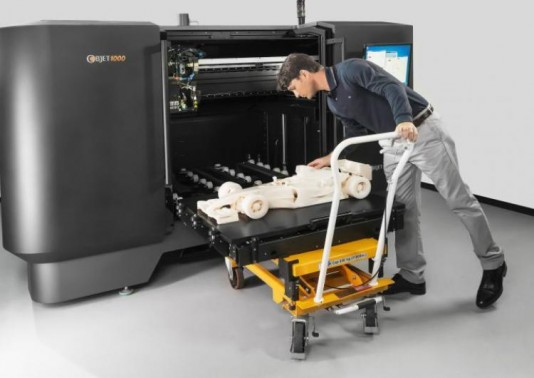
If only we had some kind of magic box where you could pour metal powder into the top and fully formed parts come out of a slot at the bottom. Then we wouldn't have to round-trip every kilo of material and lose out on the best part of the journey.

Oh, wait, we do.

From Dust to 3D Printed Gold Jewelry

Hey, if that worked... how about "if only we had a magic box that could make entire cars?"

Well, it's bigger than a matchbox.

OK, that's not bad, although I probably should have been more specific about the size.

I'm not going to waffle on about the benefits of 3D printing... that's been done. What I will point out is that if we've just decimated our traditional manufacturing industries, we have lots of experts in the art of metal who could be at home, building internet cottage businesses around endless bespoke customization (and teaming up with their local artists to do so) and fuelled by abundant local raw materials.

You know, "Middle Class" stuff. I hear it was popular during Victorian times.

The obvious way to accomplish that is to start handing out on 'semi-permanent loan' 3D printers to anyone with the skills to operate one, at least in the initial phases. We need a convenience store model running here, not a shopping mall. Let them operate out of their house, with a little counter-front, so you can send your design for print, and walk down ten minutes later to pick up personalized cutlery and a carton of milk.

Of course, the organization required to hand out tens of thousands of 3D printers puts this squarely in government territory. Since the benefits accrue nationally rather than concentrate anywhere specific, no sane commercial entity would consider it.

If you quickly establish a wide pool of expertise in a common 3D platform, then I'm fairly confident you just have to stand back from that point and make sure the new practitioners have a strong legal framework that protects their interests so long as they act in good faith. (Only licenced/verified machines to print safety/emergency gear, kind of thing.)

This is Star-Trek level thinking. Once you have enough identical replicators up and running, you can depend on them to make their own replacement parts, and improvements. Any design investment gets amortized over the whole network.

Distributed technologies have many advantages, especially social, but the big disadvantage is they take a long time to get real traction compared to a centrally-pushed agenda. (especially if they're in competition with one) Why not combine the best of both worlds?

That's the key here. The potential is great. The biggest risk of these new technologies was their chaotic - possibly decimating - impact on manufacturing, but that just happened anyway, and with no replacement.

The lessons of technology show that it doesn't really matter which platform you pick, so long as there is broad compatibility. Skills and software need to transfer easily. If you start with a fractured and incompatible base, you spend the first five years arguing whether VHS or Beta is superior.

We could skip over all that. Straight into a 21st century manufacturing base - distributed, locally advantaged, independant. Then the flood of little boxes on eBay will start going in the other direction.

The Chinese word for "crisis" is actually not the same as for "opportunity". But in English, it increasingly is.

Tuesday, February 4, 2014

Building a Droid Nervous System


I have been so old-school recently I'm practically covered in chalk. Here's a screenshot of what I've been working on. (Yup, photo stolen from my screens review.)


This is the 'main menu' of my new miniature programming environment. It's Turing-complete, real-time, multitasking, has an interactive editor/debugger, and is field-programmable. It's intended to drive small robot-like toys and devices, and is "non-linguistic" in that it only uses numbers and math-like symbols, not words, for all programming concepts.

It is also the simplest possible language I could create that fulfils those requirements. It's less complicated than most calculators. In fact, it tries very hard to act like one.

And it fits in 26K. It would probably work great as an industrial controller, too.

Primary Features:
  • 128 pre-allocated global variables, called 'signals'
  • (up to) 64 code fragments which can perform math operations and conditional tests on the signals.
  • A 'trigger list' per signal, which defines the code fragments to run when a signal is changed.
  • Some signals correspond to sensor inputs, so sensor updates will trigger code.
  • Some signals map to robot 'outputs' such as motor speeds, lights, and noises.
Here are several things that seem, at first glance, to be missing from the "language".
  • Names.
  • Loops.
  • Function calls.
  • Trinary operators.
  • Recursion.
  • Comments
The lack of names is intentional, (and there's no memory for comments) but the other concepts can actually be built out of the few axioms we start with.

This programming language is based entirely around "accumulator logic". The "accumulator" is technically the name of the big number displayed on a calculator screen. The number to which all operations are done when you press the buttons. Some calculators have buttons to store or reload the accumulator from "memory" slots, and it's this basic concept I ruthlessly extend, so keep it in mind.

Here is the complete list of all possible math and skip operators the language supports:

:=Left Assign=:Right Assign=0Skip if Zero
+=Left Add=+Right Add!0Skip if Not Zero
-=Left Minus=-Right Minus>0Skip if greater than Zero
*=Left Multiply      =*Right Multiply     <0  Skip if less than Zero
/=Left Divide=/Right Divide
&=  Left AND=&  Right AND
|=Left OR=|Right OR
^=Left XOR=^Right XOR

What's up with the "left" and "right" versions? Basically, it's the choice of whether the "next thing" modifies the accumulator, or the accumulator modifies the thing. All operators are 'symmetric', (including a few that don't make complete sense) and have only one "operand" (parameter) per op.

Assignment is the easiest to understand. If the "right hand thing" is one of the memory slots, then "left assignment" will load the accumulator with the memory value. If we "right assign", that's storing the accumulator back to the memory slot.

Instead of just assigning (copying) the value, we can 'combine' the source and destination numbers in various mathematical ways, like adding, multiplying, or boolean logic. But we always apply one thing onto another. (No triplets!)

There are some cases in which the symmetry is a little broken. Assigning the accumulator with the constant number "3" is clearly fine, but trying to set the constant "3" to any other value makes no sense, so it becomes a "NOP" - a "no operation". The closest thing we have to 'commenting out'.

However, either the left hand or right hand can be "indirected", and this is where the language powers up... I use surrounding brackets to indicate whether the side is treated as a raw number, or as a signal reference. Here's what a fragment of that code looks like:

  := 3Load accumulator with the constant value "3"
  =:(3)Store that in signal index (3)
  +=(4)Add the value of signal (4) to the accumulator. 
  += 1  Increment the accumulator by one.
  =+(5)  Add the accumulator to the value in signal (5)

Once again, the order and type of operations is exactly that if you had to solve the problem yourself using a calculator, albeit one with 128 memories.

Indirection is also symmetric: you can put brackets around the left hand side (the accumulator) and operations will occur to the signal that the accumulator value references. So the first two lines of the above code (which put the value "3" into signal "3") could be rewritten:

  := 3Load accumulator with the constant value "3"
():= 3  Indirectly load that signal (3) with the constant value "3"

When you are using the editor/debugger the accumulator values are shown down the left, so you know what's going where.

The comparison operators are a little different in that they don't have any indirection. They always test the current accumulator value, and their operand number is used as a count of "lines to skip" if the test is true. They don't even specify another value to test with... if you want to check equality with a number, you need to subtract that number beforehand yourself and then test for zero.

  :=(9)Load accumulator with signal (9)
  -= 13  Subtract "13", which is our test number
  =0 >> 1  If it was equal, skip the next line.
  := 1  Load accumulator with "1"
  =:(8)  Store the accumulator (now "0" or "1") into signal (8)

That's it. And while there are many obvious ways the language could be improved with extra "syntactic sugar" to make certain operations more convenient, they come at a cost.


Building Up From There

Function Calls:
So if there are no explicit function calls, how do we chain code together?

Traditionally we would define functions, their parameters, and return values. We'd name variables and have a call stack. We would have a line of code that 'calls' the function, and passes in the named variables on one side, to come out the other side with new names.

Remember that modifying a signal causes all the code attached to that signal to trigger and run. We can specify a code list in the original trigger, or we could (in one code) write a value to another signal which triggers more code.

What's happened here is that we now have to manually do the job the compiler used to. Variable names compile down, eventually, to a simple memory reference number. We now have 128 globals that we can put values into, and then call code which also has total access to those variables. So we can use the signals as the equivalent of parameter slots!

So instead of having a function which accepts three parameters, we can use any three signals we want as our parameter holders, and we make sure that changing one of them (or all of them) triggers the relevant code.

So we don't call functions explicitly, but we can change 'variables' which implicitly runs more code later.

However, we have lost the ability to wait for a reply. "Triggering" other code does not run it immediately. The current code fragment has to finish, before anything else can happen. In other words, we actually can't do procedural calls, but a form of message-passing.

Loops:
The language contains a 'skip forward' comparison operator, but no 'skip backwards' test, or 'goto' equivalent which would seem to be necessary to implement loops.

However, there's no reason why code can't write back to the signal that triggered it, in which case it will run again. Simple FOR-loops can be constructed by setting a signal to a start value, and decrementing by one if the value is still above zero. When the self-triggering code reaches zero, it will stop updating and the loop will end.

Since every triggered signal gets a chance to run (in order), multiple signals which are looping will be interleaved - a primitive form of multi-tasking.


Why?

The choices made seem weird, and restrictive, but let's look at some of the consequences that a LOGO or BASIC-inspired language couldn't do:

Multitasking: We could potentially have all 128 signals triggering themselves, checking for conditions to be satisfied, and then looping again. No signal is ever 'blocked' because another is performing a long calculation - since code always runs linearly, can't loop and can't jump to other code, each fragment is guaranteed to finish quickly.

Fixed Overhead: Moreover there is an essential problem with the idea of recursive function calls - they require a stack of unknown size. Every embedded call burns up more stack space, and there's not much to start with. We 'flag' code to be run, and get to it once the current code is complete.

Responsiveness: This is where the "Nervous System" idea comes in. We are not creating one big master program with a mainline code path - we are creating "fragments" that hang around waiting for their trigger conditions. "Reflexes", essentially. And we expect that sometimes those reflexes will work at cross-purposes. Hopefully the robot will externalize this conflict (by twitching to and fro) rather than sullenly sitting in an infinite loop.

LOGO has been the exemplar of educational programming for decades, but the kind of programming it teaches is close to obsolete. Web pages use javascript to attach event handlers to buttons, most of which never run. Databases use table triggers to cascade updates. Graphics cards have vertex and fragment "shader" hardware which do not allow variable-length loops or recursive calls or dynamic memory allocation, in order to get massively parallel performance.

Learning LOGO today would be counterproductive. It barely even prepares you for driving a turtle around, let alone modern programming concepts. And what I've found is that if you strip those modern esoteric concepts (Like "flow-based programming" or VHDL) down to their simplest axioms, their power remains.

Wednesday, January 29, 2014

Review: Arduino Screens: 1.8TFT SPI, HY-TFT240, CRIUS CO-16


Most of my projects need user interfaces, or at least benefit from one during the development process, so today we have three cheap screens of various sizes and capabilities. As usual, the answers first:
  • 1.8TFT SPI - ST7735 1.8" inch SPI TFT LCD Display Module 128x160 - $6
    It's small, light, low-requirement and perfectly matches Arduino hardware, especailly the "Micro" gear. This is the one I just bought more of. 
  • HY-TFT240 - ILI9325 2.4" inch TFT LCD Module 240x320 -  $12
    Twice the screen, twice the cost, twice the pins (at least) needed to drive it and a touch surface as well. A nice screen for larger projects, or where the screen is the project.
  • CRIUS CO-16 - OLED Display Module V1.0 128x64 - $10
    Total fail. It's dead jim. No lights, no response over I2C, both units completely DOA. An ex-parrot. Apparently a "known design flaw". Avoid the V1.0.

Here's the three screens under test.. going clockwise from the top-left we have the 2.4" inch ILI9325, two ST7735 1.8" inch displays down the right (one powered, one not) and the pair of dead CRIUS OLED displays in the bottom left.


First things first - both functioning screens were bright and clear, and roughly equal in resolution (in terms of absolute pixels per inch) colour range, and backlight brightness. One was just almost twice the size.

I didn't test any of the ancillary functions such as the touchscreen or SD cards. Just the display.

The larger 2.4 inch device has a touchscreen on top and this does affect the visual clarity slightly, so the smaller 1.8 inch display does look sharper when they're side by side - but that advantage will quickly be lost if it's emplaced behind any kind of clear protective panel, whereas the larger one is already ruggedized and covered.

Apart from that, the specifications are very similar. Backlight and 16 bit "RGB565" color. The driver chips have a distinct family similarity, similar start-up and command sets. Colors are vibrant and clear, although blues do need a gamma boost.

I did not do any side-by-side performance testing, because in general that wouldn't be appropriate or very meaningful. There are entirely different software stacks involved. One is SPI and the other Parallel, so the basic hardware protocols have different overheads. From what I could tell from experimentation, the bottleneck in all cases was the Arduino/Atmel. So if I tried, I would really just be measuring how fast the microcontroller's internal ports are.

They even had the same disappointments: both modules are "write only" due to what I would almost consider flaws, but I'll charitably call 'focussed design'. In neither case is it possible to read back values from the display driver chip. 

That means you can't read the contents of the framebuffer from either display. That's a real shame, since they have more memory than the Arduino does. And can shift blocks of it around independently. It also means you can't read back configuration registers, or check if the device has crashed, or is actually there at all. You just have to trust that it's listening.
On the 2.4", the octal line drivers (those big old-school chips on the back) that convert 5v logic down to 3.3v are unidirectional... the R/W signal gets through from the microcontroller to the LCD driver, but the lines are one-way. It electronically cannot send a reply back.

The 1.8" SPI device has an even simpler version of the same story; it doesn't break out the SPI MISO line at all, so the apprentice device has no wire to communicate back to the master. (The SD card interface does have both MISO and MOSI lines, but they are 3.3v and will need a voltage converter to play with.)

But, this clearly doesn't stop you from sending data to the screen, which is the point, after all.

ST7735 1.8" SPI TFT LCD Display Module 128x160

So, let's start with what I think was the winner. Why? Because (a) it works, (b) it's cheap, and (c) it really only needs five pins to run it. Four, if you connect the reset line to the Arduinos' reset. (Which works fine) Two, if you already use the SPI bus and just need the line selects.


Alright, back up to three if you add in the backlight, which I ran directly to Vcc, but you can connect to an I/O pin and turn on via PWM, if you want variable brightness. So there's flexibility.

Mine was the 'Blue Tab' version, (note the blue tab on the screen 'protector' film, sticking out the bottom left) which turned out to be compatible with the 'Black Tab' variant for the Adafruit GFX libraries I used.  I've got to say, I am impressed with Adafruit's software and drivers. They could still be better (but not by much) and they are streets ahead of most of the dross that passes for 'drivers' I've seen.


The single row of pins means it's easy to mount in a breadboard. The mounting holes are nicely placed. I do however feel that the screen itself is not very securely attached to the carrier board, (it feels like two small spots of glue in the bottom corners and the ribbon cable are all that holds it.) and I'm tempted to run a 'weld' of superglue or silicone down the sides of the display where it touches the board, because I'm worried vibration and shock might eventually shake it loose.

That wouldn't be an issue if the screen was 'sandwiched' between the carrier board and a clear panel, say through those bolt holes. 

The screenshot is of my new "droid control" software I'll be releasing shortly, which was designed on that very hardware over the last few weeks.

ILI9325 2.4 inch TFT LCD Module 240x320

This was the first one to arrive, and I'm still looking forward to exploring the touchscreen functions. It's a surprisingly large chunk of hardware when you put it next to an Arduino. The thick glass and sensor overlay add to the weight.


Orientation does matter, but really only for one situation. You can't tell in the photo, but the line-graph on the display is scrolling upwards quite smoothly at 50-100FPS. My own drivers get right into the ILI9325, and I make use of the hardware scrolling to achieve this, because otherwise a full screen redraw takes about a second. The hardware scrolling can go up or down, but not sideways. (That I have discovered.. the documentation can be a bit opaque) Which means if you intend to have scrolling text, then it's going to be in 'portrait mode'.


You might think the wider 8-bit parallel data bus would speed things up over the two-wire SPI interface of the smaller device, but you'd be wrong. The Armel has dedicated hardware for the SPI interface, with interrupts and everything, but it's nearly impossible to find an entire microcontroller port where writing one byte will correspond to eight Arduino pins flipping state. And you still have to manage the control pins 'manually'. 

Just remember that the larger screen means you have to transfer more data when drawing, and this is already the primary bottleneck.  Forget it if you want to do full-screen animation, you'll be lucky to ever break 2fps. (Hardware scrolling uses the trick that only the bottom line changes)

What is this thing? This was actually the prototype for the Sonic Screwdriver Mark I that I built in November. The line graph it's showing is the six-axis output of the accelerometers and gryos on the small device you can see hovering just above the screen. All the lines are flat and boring because I was trying not to bump things while taking the photo.

CRIUS CO-16 OLED Display Module V1.0 128x64

The first thing I've ordered off ebay and hasn't worked at all, although may be the reason you can buy them so "cheaply" given they are more advanced technology (OLED) than the LCD screens above. It was a long shot, I suppose. Perhaps I dreamed too much.


There are a few pages that suggest the OLED module itself is fine, but you have to remove it, hack the board, then solder it back again. Because the tracks that need to be hacked are underneath the ribbon cable connecting the screen to the board. Then you just have to solder a small resistor/capacitor combination across the reset pin and... 

Yeah, I don't think so. I have other things to do. The same pages said the reset issue caused 'snow' on boot and I haven't seen a single lit pixel.

They were nicely packed, though, and being individually sealed in anti-static bags I don't expect the seller had the ability or inclination to test them.

I'd be interested to hear from other people about this one. Maybe there is a mode I haven't figured out? Anyone got these to work?

Saturday, January 25, 2014

Venting my Arduspleen

Firstly, why do so many Arduino projects put either Ardu- or -uino in their name? If you combine more than three of them in a sentence, you sound like you're speaking Pokemon.

I feel it's good to get my grumpy out before releasing major blocks of code. It's cleansing. And it's a warning to myself, of things I must avoid. Lest it be quoted back at my face...

And another thing!.. Why doesn't the community realize that it has almost fragmented itself by lack of tool unity? There isn't just one learning curve.. there are at least three, as you outgrow each sandbox level and have to throw away vast wodges of code written under the previous paradigms.

Here's an example. Using the provided functions like pinMode() and digitalWrite() and tone() functions leads to a dead end. Do you realize how much memory tone() consumes? Or how slow digitalWrite() is?

You can tell when coders graduate to Arduino Level II because they stop using them and start setting bits directly with "PORTB |= (1<<6)" style statements. Because while it looks ugly, it compiles down into an indirect single-bit test. Calling a function, by contrast, is easily twenty or thirty bytes of overhead, just for the function call. The definition is worse. It's slower by an order of magnitude.

But the assumption is "teach people the nice and friendly one first, and they'll learn about the harder version when they need to."

Only it doesn't work that way, because real code ends up filled with a mixture of both styles, and beginners and experts alike not only need to learn about both forms, but they also have to learn about the behind-the-scenes interactions when they are combined.

The result? Bad code. Everywhere I look. Just truly awful code.

Primarily that's the fault of the development tools. They don't connect the programmer to the device they are programming, they disconnect you. It's like the IDEs have an agenda.

The Arduino IDE has an agenda they got from Processing... a pedagogical approach to software development that's best summed up by the 'Examples' menu and the lack of line numbers in the source code editor.

The Atmel 6 IDE seems to be a sales tool for a product called "Visual Micro" to the extent it will joyfully install a new bootloader on your device that links it to trialware. Hmm.

It's got to the point where I use Eclipse for the bulk of my coding (since the Arduino IDE really isn't into editing it's own libraries, and most of my code is now in libraries) but flip back to the Arduino IDE for the compile/upload task.

I've yet to find a sensible reason to use Atmel Studio 6 since the one feature I really wanted - the Simulator for debugging without downloading - doesn't work with Leonardo-compatible "32U4" chips. Or very well at all. I tried tracking down my hardest and subtlest bug using Serial.print() statements and pure logical thought last night while simultaneously trying to configure and use the debugger for the same purpose. The first method won. I'm still yet to get a single line of code to run in the simulator.

Neither "official" tool seems able to bring up an assembly listing beside the source code, like I used to be able to do with the PIC microcontroller development tools. That's another crucial thing you need to see, but is hidden from you. (literally deleted as tempfiles, unless you set special options) No-one wants to write assembly, but being able to see what your code compiles into is a crucial part of optimizing it for size and speed.

Then there's the Arduino Playground. I don't want to be mean, so let's just say I'm looking for something a little more grown-up for programs that can't just be cut-and-pasted into a comments box.

Mostly, the Arduino community doesn't seem to realize, in it's enthusiasm, that it is ignoring lessons from the history of microcomputers as far back as the TRS-80. Mostly, that Reified Object Orientation is a luxury afforded by big memories and fast pointers. But also that bit-banging magic numbers is a path towards incomprehensible code. There are other ways, hard lessons learned by the Linux Kernel community that might apply, but once again the need to "simplify" the environment has excluded them.

I have been building my own tools, of course - micro operating systems for the Leonardo, with a command line that can read and write pins without having to reflash the whole damn chip. I just finished a module that can store a hundred 'mini files' in a journaled (or "log-structured") filesystem within the 1K eeprom. My masterpiece so far is a real-time robot control system with a joystick-based code editor and debugger. (An IDE on the Mega32U4!) A common thread with these is a willingness to dive into the messy details of the silicon, and not to abstract them into meaninglessness.

Even as my code becomes more advanced and optimal, I'm finding the provided tools less useful in helping me achieve that. I've fallen off the end of the learning curve again. All of them.

Creating "a new approach" would just add to the problems. What we need is a willingness to pull together all the existing IDEs and bootloaders plus a few base libraries and create a platform.

I could spin you a tale of literate programming editors that cloud-compile to all known targets, that reference compiler versions and branch tags instead of library dependency names so that old projects can always be recompiled byte-perfect. The messy, but important stuff that means you have more than a toy, even if it is part of one.

Sunday, December 15, 2013

Where's My Quantum Computer?

Actually, the title is a bit of a tease. I know exactly where they are. But people can't seem to get their head around the coding. And that's holding back demand.

Do you think transistors (and therefore computers) are Boolean devices? Would you be uncomfortable if I told you that's wrong, and easily proved? Which means they are not logical and deterministic machines which will always carry out the same series of instructions given the same program, like they told you. Sorry.

Sure, logically they do. But physically, things are more complicated. I'm sure you guessed that already. If you happen to present a transistor with a gate level that just happens to be a critical 'in-between' voltage, the transistor will not switch into a state representing either zero or one, on or off, but instead goes gray.

The technical term is "metastable", because often it doesn't just sit maddeningly in-between - it balances there and generates white noise, blasting out randomness into the rest of the circuit.

This ambiguity value can propagate, if it matches the metastability of the next transistor. And the next.

Why don't you experience this all the time? Because pretty much every aspect of digital logic design at the physical level is intended to hide it. Big fat specifications with timing diagrams which say you should never present such indeterminate voltages, and if you do then it's your own fault. We have bistable latches, Schmitt triggers, lockup protection, thin films designed to decrease metastability, and design features so core we take them for granted...

Such as the clock. The entire point of a central propagated clock (and all the resources it requires) is to create a moment where all the transistors shout "change places!" and move through their metastable zone before any measurements get made. It is why "clockless logic" has devolved to just redefining what "clock" means.

And if any of these elaborate protections guarding each and every Boolean 'bit' (actually made from rushing flows of billions of electrons sloshing from potential to potential through the bulk silicon) fails for just the tiniest nanosecond, your computer crashes.

That's why they crash. That's what a "hardware fault" is, and why they're so frustratingly random.

It is the underlying reality of your machine asserting itself, in contradiction of your Bool-ish fantasies. You can't get rid of "noise" entirely, because much of it comes from the atoms within the wires your computer is made from. Just ask Benoit Mandelbrot.

The fact we can construct near-perfect self-correcting boolean simulation machines out of piles of reheated sand is really nothing short of a technological miracle. And is taken entirely for granted.

Students of Object Oriented Programming are taught the tenants of the faith: "Encapsulation, Abstraction, Polymorphism". But they think they are virtues, rather than necessary evils. Abstraction in particular gets totally out of control, with over-generalized interfaces that map well to human concepts (as defined by committees) that bear no relation whatsoever to how a real machine actually would perform the task.

It's why "shader" programmers for game engines are a special breed. They have to smash classic linear algorithms into parallel pieces which will fit into the graphics card pipeline. Abstraction doesn't help one whit. It is the enemy of performance.

There's an equivalent in relational database design: "Fourth Normal Form". (Or even Fifth!) Students are taught how to renormalize their database designs to make them more logical, and are graded on it. Then you get to work on real high-performance transactional systems and quickly rip all DB designs back down to second (or first) normal form, because otherwise the system is too slow for words and users get angry.

If you are using abstraction to hide the details of a problem rather than reveal them, you are using it the wrong way around. Encapsulate the code, not the problem. You can't generalize from a sample of one.

This obsessive need to abstract away and deny the underlying machine is why we're very bad at quantum programming, which pretty much by definition is a sneaky way of arranging the dominoes of reality to fall in a certain way. And while reality is playing quantum dominoes, we keep designing programs as if the game is billiard balls.

And when you ask why, the answer is essentially "because it's easier for people to reason by analogy about billiards".

The assumption here is that the point of computer science is to create nice and easy structures for humans to comprehend.

Um... OK.

And that's why you can't have a quantum computer. Because the only metaphor or abstraction that has any value currently looks like this:


Sure, we have names for some of these concepts. "Superposition" and "entanglement" and so forth, but they have common characteristics and behaviours we have yet to find well-rounded words for, that everyone intrinsically understands. Unless you count "timey wimey".

So forget trying to understand Quantum Information Theory in terms of something else. There isn't.

Just bang the wavefunctions together!

Sunday, December 8, 2013

The Importance of Dreaming

While soldering things together, I get a lot of time to think about the general course of technology and so forth. And I'm now old enough that I've personally seen a large chunk of the story arc. So rather than post a work update, I wanted to get out of my head a thought that's been rattling around for a while, but recent events have solidified.

Let's start with what sounds like the intro to a terrible, tragic joke: What do the the Newtown Shootings and the Space Program have in common? They are both ways an individual can leave their mark on history. I've been learning how Adam Lanza was apparently inspired by previous school shootings, and had newspaper clippings about such events going back a hundred years to one of America's earliest. He learned that such heinous acts were a path to notoriety, to fame, and he was right, because I just said his name, and you know who I mean.

Not too long ago, there were other ways of achieving such fame. You could become an Astronaut, and walk on the face of another world, for example. Granted it was unlikely - the first round of jobs generally went to the upstanding military types who had been kind enough to fight a war on their country's behalf, but the feeling was that soon we might all have the chance to do something that had never been done, to write our own small piece of the new history.

But that doesn't happen anymore. We aspire to efficient repetition, now. There are far less jobs around so new they don't have a name. There's a stagnant stability to our culture, and we've stopped doing the cool stuff because it was too difficult. No Concorde. No Space Shuttle. Not much to replace them. Maybe we'll go back to the moon next decade. Jupiter? Don't make us laugh.

Buzz Aldrin is reduced to punching bloggers in the face.

When the blue-sky options contract and all the papers talk about are the latest tragedy, when the walls of society close in, we lose something. Modern culture's mantra is that fame is all that matters, and if you're not born pretty or sporty in exploitable ways, there aren't many options left. A whole generation destined to die forgotten, ignored, because we withdrew the support structures and funding needed to feed those dreams.

We just passed discovery of the 1000th exoplanet. One seems to have water. There are, literally, new worlds to explore. But we think they're out of reach, so no-one cares.