Monday, November 11, 2013

Ultrasonic, Man!

These HC-SR04 ultrasonic ranging modules work brilliantly. They have a cone of about 40-60 degrees in front of them where pretty much anything - ceiling, coffee cup, pen, cloth, hand - will bounce the signal back and give a clear, clean, to-the-centimeter distance reading of the closest obstruction.


The only exception seems to be hitting smooth surfaces at high incident angles - in which case the return echo is bounced too well, and physically misses the receiver.

Did I mention I'm building a droid? Technically, a child's toy for Christmas, though I want it finished long before then. Actually, I'm building multiple "robots" at the moment, but this one is worth documenting.

eBay and the internet is making this a much easier task than it used to be. For $25, I got a complete 4wd "smart car chassis". I'm really hoping it arrives this week, since most of the rest of the pieces are already here and working.
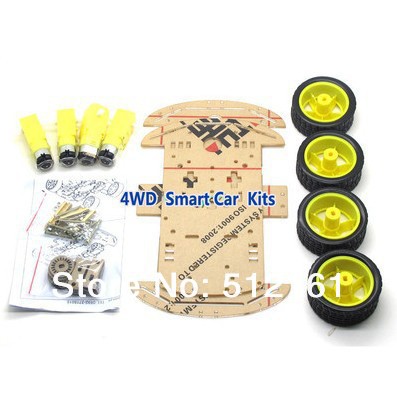
This follows my current approach to robotics: Start with the sensors. It doesn't matter how fast you can go, if you don't know where you are.

This droid will have at least three major 'external' sensors:
* Ultrasonic Ranging Module
* Digital Compass / magnetometer
* Infrared Receiver

as well as a couple of internal ones:
* Temperature
* Time
* Power Levels (maybe)

I've had each of these working individually now, but I'm learning one of the hard rules of Arduino development - combining devices together with one microcontroller gets exponentially difficult, due to limited shared resources. Making all of those parts work together at once is taking some programming art. I've got it covered, though.

A new approach to programming toys.

When I was but a little programmer, I really wanted one of these:
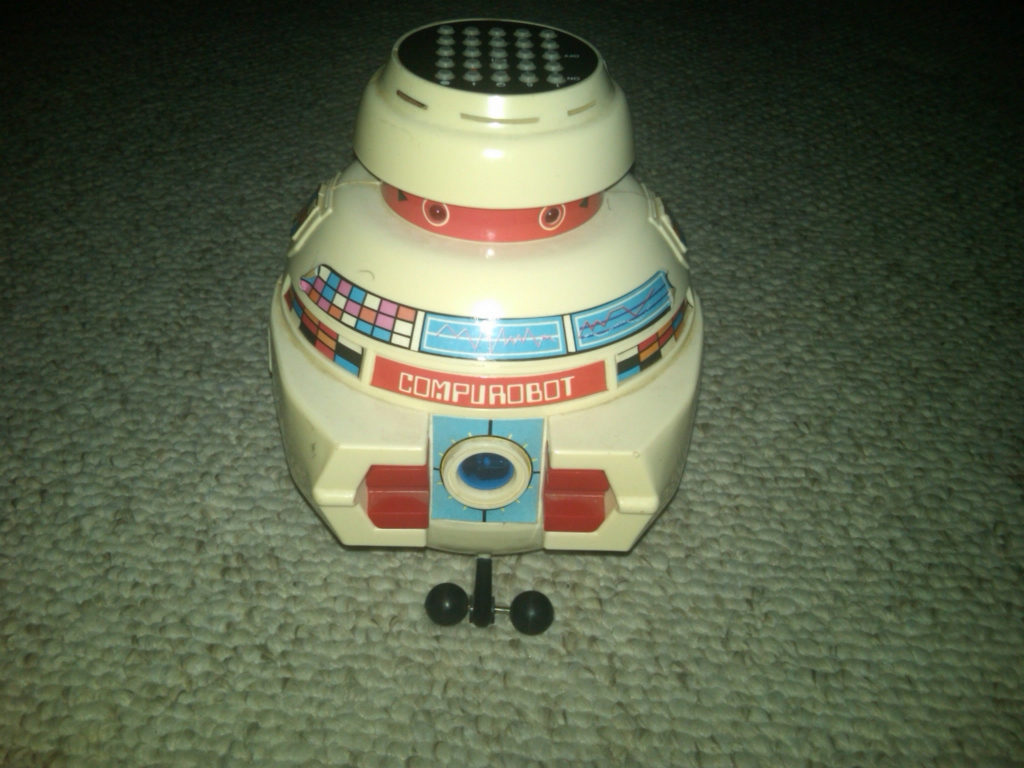

To the point that I read and practically memorized the manual, while standing in the shop. I couldn't physically have one, but at least I could carry away the idea. In many ways that toy embodied programming as it was in the early 80's.

But as brilliant as it was (I should find out who designed it, and drop them a line... ooh, Nolan Bushnell might has been involved...) programming has changed considerably. I do not think an exact recreation of that toy would be beneficial to an understanding of modern computers. Here's what I mean:

Vincent implemented what was essentially a stripped-down BASIC (or perhaps LOGO) without loops or conditionals. A simple series of instructions like "Forward 80" or "Left 2x60" that would inevitably lead to a tumble down the stairs, which is why I assume that not many survive.

A robot like that, even with IF and REPEAT statements, spends most of it's time doing 'nothing' but waiting for the timer on the current command to expire. Such droids are deaf, dumb, and insensible for most of their lives. And they act like it.

The only way to make such a 'bot respond to two things at once is essentially to write your own mini-scheduler for each unique combination. Fun!

But modern programming is all event driven. Not even multitasking, anymore. Node.js has shown us what happens if you stay single-threaded but make every call non-blocking - performance increases, and resource use decreases.

So I have reduced that concept to it's essentials. My droid's "brain" is composed of 128 "signal" slots. Reading a signal is identical to reading a value out of an array, but changing a signal will cause any "codes" attached to that signal to execute, either "now" or "later".

The "later" timeout is probably going to be globally set to 1/10th of a second in early versions, but could be faster for droids that need more temporal resolution. What is critical is that the 'later' timeout is reset if another write to the signal is performed. (The 'now' codes are still executed immediately.)

There's an excellent reason for all this which involves a lot of computing science. With just those two 'event' types, we get a universal system.

A "code" is a set of arithmetic instructions almost identical to the standard accumulator logic of a pocket calculator, plus an if/skip statement.

Loops are apparently not implemented, but any code can write another value to the signal which triggered it, which will cause it to trigger again. A classic "If signal>0 then signal = signal-1" will keep the code 'looping' until the counter gets to zero.

Infinite loops are not a bug in this environment. They are an essential way of getting things done. The interpreter is designed so that every signal could be "looping" simultaneously.

This creates a network of event-driven fragments of code. There are no explicit functions calls either... code simply triggers other code by writing to signals. There are no parameters to pass - needed values are read out of the signal array.

If you're into Comp. Sci, this is an extreme mash-up of core OCCAM and Javascript concepts.

This all sounds a lot more complicated than it will appear. "Codes" are simple lists of calculator arithmetic instructions (with the 128 signal registers being equivalent to memories) And each "Signal" is just two lists of codes, to run now and later. That's it. Universal turing machine.

I'm hoping I can go entirely "symbolic" for this. (English is an assumption... "pre-linguistic" programming is possible.) Since only 128 signals and 64 code scripts are possible, each can be assigned a unique "icon" instead of number - to be redrawn by the droid's owner to suit their conceptions of what it means or does.

This "digital nervous system" can be patched and changed in real-time without touching all the other signals or codes. Improvements to the droids "program" can be made in-the-field with a remote control, without the tether of a programming cable or IDE. (Hey kids! Who wants to use an Integrated Development Environment? It's totally fun! Where are you going?)

The droid will slowly accumulate it's responses over weeks and months (stored in EEPROM) not the "tabula rasa" approach of Vincent, who lost his memory on every reset and battery change.

No matter what cool new tricks you teach it, the droid should never forget that if it can't see the floor right in front of it's face, it should stop going forward. (That's the third law of robotics!) Or what to do when power is low. Or how to fire the Lasers!

Toys are tools to spur the imagination, and our understanding of the world. Good toys are ones that can be woven into existing play, that can offer possibilities rather than constricting choices. That is a very fine line to walk when dealing with robots. I think the answer is to be very clear about limitations, but be as free as possible within them. Pre-approved capabilities, but not pre-approved uses.

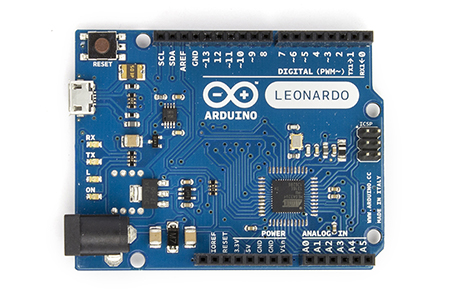
I'll be releasing the code as soon as it's done. If you have an Arduino-based "collision avoidance robot" (not the official arduino robot - I don't have one of those...) made out of a Leonardo/Atmega32u4, random cheap sensor modules, and a couple of motors, then you essentially have the same platform I'm building for. I personally think a compass is critical, (more than axis encoders) and you might even want to go for a full 6 or 9 DOF accelerometer/gyro/compass module. (GPS is probably way too much... probably...)

Oh, I've also written a "Beeps" module which makes a wonderful range of droid-sounding noises. I am genuinely astonished at the personality that a few warbled squeaks can imbue. I let it randomly generate "phrases" for a while, and kept the best sounding ones.

Wednesday, November 6, 2013

Gyroscopic, Man!

Have you seen how good accelerometer technology has got? I just bought three for $12. They have 16-bit resolution, and programmable range from 2 to 100G!

The tech has been improving ever since Nintendo introduced their Wii Nunchuck. Consumer mass production plus improving technology have driven some significant advances.


The techno-secret is in the modern ability to etch "Micro Mechanical Systems" (MEMS) onto a silicon wafer, as well as electronics. Tiny metal-coated cantilevered beams, supported on silicon pivots, with masses measured in the picograms.


I remember the original demos of this technology - micro-motors that seized up after ten seconds of runtime. A set of balance-scales that could weigh individual molecules. It was cool, but there didn't seem to be any obvious applications outside the chem lab. And silicon wafer tech works best when it's all sealed up, so it seemed like a mismatch of needs. Little did we know...

Turns out if you leave the molecule off the end of the tiny mass-scale, what you have is an inertial sensor. If the whole set of scales is moved to and fro in a way which affects the balance, then it's measurement will reflect the acceleration it's under. Boom, you have an accelerometer. You'll need one for each XYZ axis, but hey, if we're etching them on a chip that's not really a problem. (Well, maybe the Z axis...)

The sensor in the Wii Nunchuck is now an early-generation analog model. The latest devices have better everything, including a major innovation - gyros!

Knowing how fast you are accelerating in the three cartesian axes is very useful - but there's a missing set of dimensions - rotations. If you rotate a 'simple' accelerometer, it has issues distinguishing that from a lateral movement. A sideways impulse and a twist will both change the vector direction of acceleration due to gravity (hereafter called 'down') by roughly the same angle, but the twist will generally leave the vector the same length. But this subtle difference can be hard to distinguish through sampling noise.

However; if you have two accelerometers a distance apart, then you can measure the instantaneous differential, which will correspond to the gyroscopic motion. Their correlation will correspond to the pure acceleration.

That's how good the sensors have got. They can measure this difference across the chip. Barely two millimeters.

This is powering a whole new generation of mechanical devices which know exactly where they are, and how they are moving. Exactly. Better than you do. Better than GPS, in a relative moment-to-moment sense.


One offshoot is the amazing new "Toy Quadcopters" you can buy, (I just did) that sit in the air like a small flying drinks tray. Or other little home-made robots I've seen that balance on two wheels in the same manner as a Segway. (and can also carry drinks on a tray. Robotics people clearly get very thirsty.)

I'm going to use them on my telescope (along with a digital compass module) to tell which way it's pointed, and how it's moving under the influence of the motorized mount. This bypasses all the normal crap with axis encoders, which is excellent if you want to count motor shaft rotations. (because all your mechanics are perfect, predictable, and wobble-free. Ha!) That's the only case where taking measurements half-way through the mechanical chain can be expected to approximate the thing you really care about - where the optical tube is pointed relative to 'down' and 'north'.

16 bits (well, 14 really, on the 2G range including plus and minus sides) is a LOT of 'down' accuracy. As good as counting stepper increments before gearing, according to the math,

I'm also building some toy robots with the tech, but that's hardly new. Also perhaps a rugged 'wand'-like UI device that uses gestures to change settings, rather than buttons. Buttons are expensive. And big. And so... binary.

Tuesday, October 22, 2013

Maxwell's Daemons

Busy, busy. I have 2,300 lines of C++ Arduino code now. It just kind of happened. I think I've physically had the platform for about two weeks. (second one arrived too! backups are good.)


I have (running on the Leonardo beside me) a "nano-operating system", with:

  • Paged virtual memory
  • Real-time associative arrays.
  • Compressed prefix trees
  • Micro-parsers for syntax decoding
  • Serial command line with various utilities:
    • time : shows system clocks (millisecond and microsecond timer values)
    • pin : set pin modes, output values (digital and pwm), read inputs 
    • serial : set serial modes
    • aref : set analog voltage reference mode
    • lcd : command LCD module on direct-parallel interface.
    • env : list, get and set "environment variables" in system associative array
    • peek : dump contents of sram, flash, or eeprom
    • compass : interface to HMC5883L magnetometer
    • scope : control a 6-LED bar to display various analog input values in real-time.

All of that currently fits in 24k, leaving me a whopping 4k of flash for further commands. Although there's a lot of underlying libraries and other cruft that get pulled in by the standard libs.

Sketch uses 24,044 bytes (83%) of program storage space. Maximum is 28,672 bytes.
Global variables use 1,115 bytes (43%) of dynamic memory, leaving 1,445 bytes for local variables. Maximum is 2,560 bytes.

That's what happens when a 'real' computer scientist like me gets ahold of actual devices like this. I make them dance.

And while some of it is ported code from previous microcontroller projects, that's not the bulk of it. In fact, the ported code actually slowed me down, because re-adapting code for a different environment (especially subtle algorithms like red-black trees) requires you to be thinking simultaneously about two systems and all their differences.

I've been adding code and drivers pretty much as the hardware comes in. That would be more impressive if "driver" in this case wasn't 20 lines of real code, and the "devices" weren't more than a single chip that talks one of the standard inter-chip serial protocols. Or things arrived faster from Hong Kong. That would be nice.

I've had one partial failure so far, which took me a little time to figure out. The compass module is apparently a 3.3v I2C interface, and can't quite muster a signal of wide enough range to drive the 5v expectant microcontroller pins. Here's what that looks like on the digital oscilloscope:


The Arduino knows it's there, kind of, but the signal isn't clean enough to properly decode. (all those "mid-way stops" instead of slamming straight from floor to ceiling in nice square-wave pulses.) although it does, rarely, get a successful exchange. So I know the chip works.

Speaking of 'scope traces, I've also been playing around with "sonic" technology, in the form of 40Khz ultrasonic transducers. (When you stick one on the end of your oscilloscope probe, it looks a lot like the Pertwee-era sonic screwdriver.)


Here's what it looks like when you apply a single 'impulse' to the transmitter crystal (just a 5v-0v level change, in this case, which 'rings' the transmit crystal like hitting a bell, or tapping a wine glass.) and the resulting waveform generated by the receiver crystal. (which was placed face-to-face in this experiment.)


The high-frequency part of that signal isn't coming from an electronic source. It's purely the natural resonance of the piezoelectric crystal pair, as the "bell peal" dies away. I expect the actual output from the transmitter starts with a huge pulse and then exponentially decays, but it takes a 8-10 cycles for the receive crystal to begin resonating in response, and even longer (40-60) for it to "reset".

Not actually what I expected. So I learned something. Science!

I'm waiting for a couple of these to arrive in the post:


Which are integrated range-finder modules, but I can tell (just by looking at the circuit board in photos) how to hack it to act in a slightly more sophisticated manner, so that a couple of Arduinos can communicate using the same original technology - ultrasonic remote TV controls - that possibly inspired some beloved fiction.

(essentially, the middle chip is an 8-bit microcontroller. Remove that, and put the arduino directly in charge!)

Well.. I might use phase-shift keying instead of direct amplitude modulation, because it's now so very easy to write a tiny daemon and dedicate it to the task.

We've got so used to 'general purpose' computers that we've neglected the advantages you get by putting a single dedicated, unhackable processor in charge. One that will continue doing exactly what you told it to, ten thousand times a second, until it's 9v battery runs out. Maxwell's Demons, in silicon form.

Thursday, September 26, 2013

Back in Hardware Mode.


So, I stayed up late last night looking though my local Home Hardware superstore's on-line catalog, as I sometimes do, and had one of my ideas. So I went there today, bought some stuff, and before the sun went down I managed to make this.


It's a telescope mount, built from galvanized iron pipe, brass fittings, threaded rod, and some roller-skate bearings. The action is so smooth, I can start it spinning and come back a minute later.

Australians will recognize this as another example of Hills-Hoist based technology.


You can just see one of the bearings on the lower swivel. I've seen a lot of iron pipe used in the construction of amateur 'scope stands and mounts (and even the optical tube assembly) but I've taken it a step further and used matching brass fittings to create bearing blocks that accept standard ABEC 608s.


The bearings can be quickly removed, and disassembled, as I did just then. Those brass parts cost $4 each new, the skate bearings cost me about a buck each back in the day (and have been sitting on a shelf for years) and I had the nuts and 8mm threaded rod lying around from previous projects. 


The real secret (and most expensive item) was the special "self-centering step drill" bit that I used to ream out the ends of the fittings, to create a 22mm 'seat' for the bearing to sit within. I chucked this bit into my drill press, and manually turned the bit, (as if I were tapping a hole) instead of powering up the press.

I have a lathe, but really didn't want to use it for this. Partly this was to find a method that works for people who don't have access to a small machine shop, and partly because I don't like them because they're so insanely dangerous. "Experiment" and "Lathe" are two words that do not go together well.

Each only took a minute or two to carefully ream out to a depth of a couple of millimeters, even by hand. Brass is a lovely material to work... you can feel the chips coming off. (Brass was cheaper and more accurately machined than the equivalent galvanised steel, which was clearly die-cast, and had terrible dimensional accuracy. Don't substitute iron or steel, or use cast parts, you will regret it.)

Actually, the 22mm drill step left the fit a little too snug. The bearings would go in, but getting them out again took a small impact hammer. So I put a small grinding bit in my Dremel, and 'dusted' off a few more thou (just enough to smooth away the drill tooling marks, really) and now the bearings drop in and fall out perfectly. A file, or some sandpaper and time would have worked too.

Total cost for the two bearing assemblies? $20 in parts, and $25 in tooling.

Given that I've see people using four 'pillow block' bearings that cost $15 each on eBay (if you're lucky) I consider this a win. Especially since mine are a fraction of the size, inline, and require no extra mounting hardware to attach to the pipe.

I not only have a new telescope mount, I have a technique for making them at will.

Also, those facing inline threads will come in very useful when I start attaching motors and gearing and torqe plates. I have some designs already, but obtaining Arduinos and servo motors will take a little time. (Assuming I don't reallocate my CNC steppers.)

Sunday, September 22, 2013

I'm floating in a most peculiar way. And the stars look very different today.


So this is where I'm at with my 3D on-line virtual astrometrics laboratory:


A big sphere, modelled on the Hayden Planetarium, stuffed with visualizations of planetary and solar datasets, (middle floor) an accurate 3D orrery (top floor) and a signal processing lab (bottom floor) floating in a virtual skybox.


I don't even have proper gravity yet, it's that primitive. :-)

I've had this web page hooked up to my telescope, and used it to process astrovideo data in real-time. It's not just a pretty face.

Pretty much everything is improved. Framerates are up. Caches are in. The LEP module now only requires 5MB of download to predict the moon's position to 1 meter accuracy, and runs twice as fast. The comms framework has moved beyond bouncing chat messages from ipad to desktop, to a level which allows peer-to-peer video streaming, in theory. (From WebSockets to WebRTC.)

Actually, I seem to be in a slight project pause. This happens from time to time. Usually once all my first-round technology goals are complete, and I realize it's all going to work as well as I hoped, I get kind of stunned by the sheer scale of it. It seems to be part of the process.

Step 1 is to dream your impossible dreams. That's the easy and fun part. Technology is the science and art of making the impossible real, so set out to do something impossible, but cool.

Step 2 is to learn why it's currently impossible. It often comes down to some critical component not being available, like perfect diodes, or superconductors, or a non-exponential algorithm.

Step 3 is to look around and realize that someone created exactly that last year, or found a way to make them unnecessary. Read lots of papers and science journals.

Now you're off to the races.

Because now you're in possession of that most valuable kind of knowledge: a single true fact that 99.999% of other people still believe to be false. You know it can be done, against the prevailing common-sense.

Of course, if you discover the critical component is still impossible, well, too bad. Project over. Try again some other day.

Failure is quick and easy. You write "does not work" and move on to a different approach. It's the usual outcome. It's when it all goes right that you have to occasionally stop for breath... In my case because I didn't really plan this far ahead. I wasn't sure I'd get here.

What matters now is engaging other people in the project, hence the very literal focus on 'Player Avatars' and peer-to-peer protocols. This is where the project strays slightly from the core astronomy focus, and starts involving psychology. For example, the particular choice of avatar that you 'inhabit' can have a profound impact on your self-perception, and even your ability to learn.

For example, I'm thinking of representing all 'players' in the environment as Astronauts. One-size-fits-all generic international space-suit to start with. you may get customizable patches. Michelle had the brilliant idea of letting the suits be 'marked up' by the environment - spend a lot of time in front of the Sun, and you get tanned. That kind of thing. If you have a webcam pointed at your head, we might even be able to go around 'visors up' and see each other's real faces.


At the opposite end of the scale, imagine if, upon entering what was purported to be a Massively Multi-Scientist Online Research Environment, you were embodied in the avatar of Donald Duck. A world populated with multi coloured giant Donald Ducks. There would be an element of cognitive dissonance that would not serve the intentions of the environment.

One excellent researcher said (I paraphrase) "Avatars have a profoundly positive influence when they represent us at our best. As we wish to be."

I'm guessing if you're insanely, professionally interested in the stars, you secretly always wanted to be an astronaut. I know I did.

To this end, I've been watching documentaries on Space Suits from around the world. Even standardizing on suits has the opportunity to introduce a vast range of what I like to think of as 'virtual hats'. From homages to history, through to some rather stylish modern threads.


Wednesday, September 18, 2013

Unboxing iOS7, no WebGL

Well, my iPad2 has finished the download, and is into the updating process. I figured I should fire up a blog post and do this sucka real-time.

My first and pretty much only need in this release is for Apple to enable WebGL in Safari. WebRTC is pretty high on the list as well. These are core HTML5 technologies, and years ago Apple kicked Adobe Flash off their devices because, they said, they had a commitment to web standards over proprietary formats.

Granted, a lot of us read between the lines of Apple's statement as only applying to other people's proprietary formats, but we're a cynical bunch.

And in truth, the web is probably stronger now that HTML5 Canvas is out there. Apple did do us a slight favor with the "dragging kicking and screaming", but a lot of people were left with slightly assaulted feeling.

My update has finished the download, but is still preparing.

Oh, by the way, you need have 3Gb of free space before doing the update. For me, that meant deleting my biggest eBooks and my entire music collection. I doubt anyone who's had their iDevice longer than six months would have that much free space. I really hope I get that space back at the end, since I rather enjoyed using my device for more than merely running iOS.

Still preparing...

The problem is, the advancing HTML5 spec is doing to apple the same thing that Apple did to Adobe. Special feature that only iOS Apps had (like using the camera, compass, and local storage) are now core parts of HTML5. Why use an App when a web page can do it all?

Apple controls the App Store, and it has shown a propensity to attack any program, individuals, or technologies which try to end-run around their tollbooth. It makes perfect business sense, but has been rubbing people the wrong way.

Apple championed open standards when it was a way to leverage their device into the market, let's see if they keep the faith. But cynical me remembers Steve Jobs changing position from "Great artists steal!" to "we must defend our intellectual property!" as soon as it was profitable.

Prep finished, I pressed the install button (before it self-pressed) it verified, and now I've got the reboot screen. Waiting....

WebGL means that 3D games and systems can be written in the browser, not as an App. We know apple has ported the technology, because you can do HTML5 WebGL in iAds. Frankly, that's a little galling. Advertisers have access to better technology (in the in-app banner adds) than web developers do in their premier browser. Some people are beginning to release special browser apps that enable this one feature. (Not available in the app store, of course. You have to download and compile it on your OSX developer box. Oh, you don't have one? Too bad.)

The install bar is over a third of the way through. This is going to take longer than I thought.

Mmmm. Coffee. Over half done now.

So, here's the test. Will Apple enable a technology that creates a better cross-browser experience for everyone, if it means reducing the value of the App Store?

Oh, it's saying "Hello" now. It's user friendly, my dear chum.

First impressions:

  1. The keyboard feels 'sloppy' now. Like, an extra 50ms or so before the press is registered. I built a HTML keyboard that felt more responsive than this, clearly worse than the old keyboard. 
  2. They Skeumorphisms are gone, just like they promised. At least there's that.
And now for the big test.

FAIL. No WebGL. No UserMedia extensions.

Cranberries.


Well, thank you Apple, for not helping. You've just managed to derail a major part of my project with one self-interested decision. I was hoping to use your hardware platform to do some interesting things, like map the entire of cis-lunar space using a network of internet connected telescopes, but I guess I'll have to use Android for that instead. Frankly, I don't have time to rebuild my apps for your gated cul-de-sac. It would have been nice to include your users too.

At least it works in iAds, eh? Now we know who you care about the most.

Saturday, September 14, 2013

Fire Map Updates - South Australia Feed Interruption

Temperatures have been ticking up again, so I thought I should review the Fire Map. Good thing I did, because South Australia changed their KML namespace from "http://earth.google.com/kml/2.2" to "http://schemas.opengis.net/kml/2.2.0" which meant all their dots had disappeared from the map. (No bells went off because technically there was still a valid XML document being retrieved - it just seemed to be empty from the old namespace's point of view, something which is often the case in the off-season.)

Doh.

Sorry about that. Fixed now. I rather wish there was an RSS feed for people who depend on the RSS feeds so we could be informed about changes to the feed before they occur. Just saying.

I also would have liked to fill in the final missing square - the Northern Territory - but they still don't have any kind of public incidents feed. At least the MODIS satellites provide hotspots. Shame; It looks like there's a lot on fire up there at the moment.

And I really need to check in again with Queensland Parks and Wildlife, (well, whoever is left) and try to get at their incidents data again, since they essentially cover half the state. (The half where QFRS don't go.)

Alas I haven't been privy to the long-term forecasts for this year, so I'm not sure whether it's expected to be a wild fire season like last time. Let's hope not, but still make plans for if it does.


Thursday, September 12, 2013

Beatmatching the Internet

The primary skill of a DJ is 'beatmatching'; playing two songs together so their beats perfectly overlap and it sounds like one song. (Do it wrong, and the whole room groans from the cacophony.)

The next issue that I have to solve is how to keep a network of thousands of browsers running my peer-to-peer app synchronized with a single network clock. If they don't share common time, then peers can't swap physics state, because positions, velocities, and accelerations are all time-related quantities.

So the paper I've been implementing this week is:
Gossip Based Clock Synchronization for Large Decentralized Systems

The basic principle is stolen from Fireflies. They blink in synchrony with each other in swarms of thousands, or even millions of the little bugs. They clearly don't have a central network-accessible timeserver, so how do they do it? Well, it's also the same way a crowd 'locks on' to synchronized clapping at basketball games. We all have our own 'clapping rate' and we adjust that rate to bring it into perceived synchrony with what we can hear - which is your neighborly 'subset' of people within audio range.


When that principle is in operation (defined as "taking the alpha-trimmed mean of all known peers". "alpha-trimming" is just ranking the list, and throwing away the top and bottom quarters, or some other fixed percentage. In essence, "going with the majority".) crowds that started with pure chaos have order spontaneously emerge, and within seconds the entire ensemble is in perfect lock-step.

Now that's all well and good, but I have also learned the secret pain of all true timekeepers: General Relativity.

Special relativity is enough trouble on it's own, but the concept of speed-of-light delays is entirely tractable and is built into the internet at a fundamental level. Instantaneous communication would really help the problem of keeping remote clocks synchronized, but isn't strictly necessary. So long as the flight-time to and fro are equal, we can cancel them out with some math.

General Relativity explains that there is no such thing as a single reference timeframe. And frankly, we've tended to ignore that as not relevant to our daily lives, but it's no longer the case. If you like having a GPS that gives better than 30 metres of accuracy, then you're invoking full General Relativity, because they have to 'slow down' the clock ticks that the GPS satellites send out because they are higher in the gravity well than us, and therefore time passes slightly faster for the satellites than us.

If you remember your Popular Science, this is the Twins Paradox. We have a situation where the atomic clocks in orbit seem to go faster because, literally, time is faster up there. Send two clocks along different spacetime paths with different time dilations, and they will perfectly record the time they individually experienced getting there, and will legitimately disagree. So we can't do the classical trick of starting a clock in Greenwich and then moving it to Mars, because the path we take will change the result.

If they did not account for that effect, your GPS system would not be accurate to the city block.

But then how does this affect the concept of internet timekeeping? Well, the internet is expanding out into the solar system, catching a ride with the various probes we send. All our protocols are based on an Earth-Greenwich-centric concept of universal linear time, which is fundamentally not true. That's an issue for the JPL planners right now.

And as our clocks get better, we'll begin to notice the same effect across the surface of the globe. If you live on a tall mountain, or in one of those gravitational anomalies, then clocks in your area are going at a different rate. At some point we'll have to add corrections to our internet routers to account for the warp, or packet times will be wrong. Your mobile phone will need know the local rate of time in order to get sub-millimetre GPS accuracy.

As for our Legal System? I'm waiting for someone to divorce an astronaut, and for the lawyers to explain whether the change in marital status propagates at light-speed, or faster. (Is it like a neutrino?) Or more importantly, what 'before' and 'after' actually mean for high-frequency nanosecond trades in the global financial system.

At least for me, at the moment, the accuracy of browser timers isn't sufficient to really show up this problem. Thermal noise will have a bigger effect, so I can get away with purely classical ideas of time. At least, in this version. Call it an open problem.

But now I know why internet timekeepers have such a crazy look in their eyes. For them, the wibbly-wobbly nature of time is a physical presence who comes into their labs and beats up their fragile human conceptions of one-thing-happening-after-another. On a daily basis.

Be kind to them.

Oh, and I got a message from PayPal explaining the new way in which they are being stupid from next month (upgrading from HTTP 1.0 to 1.1 on your servers shouldn't require the entire internet to upgrade their software simultaneously.) in ways which I expect will seriously damage the credibility of the company when thousands of small internet stores suddenly break on Oct 9, and then have to dig through their spam archives to figure out why. But frankly I'm bored of that entire kettle of stupid. My forehead can't take the face-palming anymore.

Wednesday, September 4, 2013

Cosmic Update

I've been busy with Delaunay triangulations, since they're vital to a couple of things I have going on. And then this evening I saw this:
Oh my.

It's like Carl Sagan regenerated and came back as Neil deGrasse Tyson. Parts of my head exploded.

I am so very, very tempted to wrap a vertical fin around my existing virtual astronomy dome in fanboy appreciation, but since I already planned to have one version of the Starship Imagination 'docked' for use as a presentation theater, I can simply make a place for another.

We are all clearly inspired by the same background material, and the shared feeling that it's again time for some Real Science. (Try it!) So I await in eager anticipation. No, better than that... I'll race you. 2014 it is. Let's show the world how incredible the universe really can be.


Saturday, August 31, 2013

Peer to Peer MMO


In the last few days, I've built a browser based peer-to-peer message passing system. It was easier than I thought.

I've also been building control panels, now that all the tech is working. I solved the texture curvature problem with a little trig math and storing polar texture coordinates instead of linear spatial. They look nicer.

Incidentally, I tweaked a few things, and the entire interface is now running in-browser (chrome on desktop) at 60fps, which means that technically I am redrawing the consoles (and entire 3D environment) at a faster framerate than ST:TNG was actually broadcast at. Welcome to the future.


Thanks to PeerJS, I now have a functioning peer-to-peer network between the clients using WebRTC. So far it's just carrying 'chat' messages, but it's a very short step to fully encrypted video streams.


Well, I say 'peer-to-peer network', but currently it's the worst kind - a "complete N-way mesh" where every client connects to every other client and sends everything to everyone. To say this is an area of active research is an understatement, but you have to start somewhere.

Given my fairly low needs, that will probably be good for up to a hundred clients, which technically exceeds the number of concurrent PeerJS connections I can have on their free developer account, but the software is open-source, so I can scale up to my own server when needed.

I'm still using Pusher here and there, (just another ODN Conduit type, from inside the code) but it's clear that solution has a different niche. It's more a 'fallback' for highly constrained mobile devices that can't do all the latest WebRTC networking. (Or even WebSockets) Pusher sometimes takes a second or two to get messages across the network, but it's reliable.

When you have two systems with different strengths and weaknesses, the right answer is often to choose both. In fact, if more peer-to-peer style IM services become available, I'll do my best to fold them in too. Heterogeny is good for networks.

Once again, I'm impressed by the quality of work the W3C demonstrated in building the spec, and the talented people at Mozilla and Google who implemented the hard parts while the ink was still barely dry. You might not realize it yet, but your browser has been granted all kinds of new superpowers.

My only gripe is with the quality of the tutorials; too many of the 'official' demos/tutorials are simply incomprehensible. They look more like test cases. Confusing (repetitive and overly long) variable names, poor documentation, no comments, and one-line functions that call other one-line functions instead of inlining for readability.

That's probably why no-one knows about this stuff - the awful tutorials. A similar situation exists for WebGL. I don't blame the W3C or the devs for this: The W3C specs. aren't really meant to be normal-human readable. They have to use a very precise language where terms like "must", "should" and "may" determine what your IF statements need to do. (Although I'd like to find the person who thinks "candidate" is a noun, and give them a piece of my vocabulary.) And the devs are too busy implementing the code and asking for clarifications as needed.

The poor tutorials are really our fault. Mine too, for not writing better expositions of the tech. 'Newcomers' have to document their journey, and discover the common pitfalls and misconceptions that the developers are not longer capable of making, or realizing that we might make. That hasn't happened yet, so being an early adopter means confusion and headaches. WebGL at least has the HeNe tutorials originally written for pure OpenGL and 'ported' across. The best part was their 'lesson structure', not the code. There'a difference between documenting a standard and teaching a class.

While I don't have the time to write a comprehensive tutorial, I can at least say that WebRTC seems to be worth it. Browsers can't go fully peer to peer yet - some 'signalling' by a server is required to set up the connection between consenting browsers, which specifically prevents the general 'try random peers until we get a connection' algorithms - which could potentially turn your computer into a botnet slave if it has a single insecure listener running in a web page. It's a balance, really.

But even this mediated peer-to-peer ability is going to change the web in ways I can't entirely contemplate. The platform is now ready. Let's see what we build upon it.


Sunday, August 25, 2013

Creator of Worlds, Master of Hyperbola

It's been going so well I've barely had time to update. Here's a more recent screenshot:


So, there's a lot to explain in that image, and it's only the second floor. I've moved the old signal processing consoles down into the 'basement', and the upper floor is left for the planetarium/system map.

The earth and moon should be obvious. Both datasets are from NASA. Earth is the 2013 bathyspheric "blue marble" image, and the moon is albedo corrected. The Sun is textured with the 2012 STEREO image (the first simultaneous full-sun image map) And far off to the left is a pair of Plank Microwave Anisotropy datasets: Background radiation in red, and matter density in blue.

Oh yeah, and there's a skybox too, but it's fake. Looks nice though. There'll be an option to turn it off.

The spheres are not actually spheres - in model space they're cubes. I suppose technically they are 'voxels'. Each sphere is raytraced within the cube with correct perspective, but without creating z-buffer geometry, so "hologram" might also be a good word. The spheres look geometrically perfect, but won't intersect correctly.

Why go to the trouble, compared with simply creating a triangular tesselation mesh for the sphere? Well, each "sphere" voxel is eight vertexes, with no normal or surface buffers. I can have thousand of spheres, millions, so long as they are stacked in non-overlapping minecraft rows.

I'm essentially ready to tackle the next major algorithm, the one which should elevate astromech to a whole new level: Ray Bundle Adjustment.

Long story short: Ray Bundle Adjustment is a tomography technique, think of it as the advanced successor to the 'backprojection' algorithm used to reconstruct CAT scans. Here's a good paper: http://luthuli.cs.uiuc.edu/~daf/courses/Optimization/Papers/bundleadjust.pdf

What the application? Given data coming from multiple viewpoints (such as a ring of solar observatory satellites like SOHO, SDO, or STEREO-A and B) one should be able to reconstruct the 3D structure of the volume.

Near-real-time 3D maps of the Sun and it's near volume (flares, mass ejections) sounds like a neat thing. I expect to have something working within the month.

Another load off my mind is that I found an excellent solution for one of my other problems: sensible rendering of cluster data containing thousands or millions of points. This is some beautiful work, based on the brilliant idea of leaving a step out. Expect to see something very similar in Astromech, soon as I get to it.


Lastly, I'm investigating going nearly fully peer-to-peer for the networking layer using WebRTC. In terms of spec and capabilities for moving video and data streams around, I would be an idiot not too. I'm putting together a small signalling server, and thinking about adaptive mesh "gossip" networks.

Google gave an excellent talk on what WebRTC is all about which I recommend you see, given how much impact that particular spec is going to have on the peer-to-peer internet. Without this technology, I would need some heavy central servers to videoconference a dozen telescopes. Now it can go point-to-point.

That changes many things. Assuming it all works. And it's already in your browser, most likely. There are still Chrome/Moz compatibility issues, but only because the spec is still moving.

So, progress is good. Problems are falling one after another, and the roadmap to release stretches ahead.

Saturday, August 10, 2013

"Aim it at... The Moon!"

So I thought, "keplerian elements are pretty straightforward once you get past the jargon", but there's different jargon for comets as asteroids, so that's still a work in progress. And I assumed that plotting the position of the moon would be a similar exercise.

Oh boy. Utterly not.

Let's just say that the best and easiest way is probably to ping NASA and just ask their big ephemeris computer, called HORIZON.

I did it the masochistic way, which is to port the ELP/MPP002 code out of GAL (the 'General Astrodynamics Library') and into Javascript. The amazing thing is that it seems to have worked.


See how all the lines are off from each other? Like it's a couple of rounds of a strange attractor? Well, that's actually correct. The "orbit of the moon" is chaotic. Not a neat hoop. Practically everything in the solar system perturbs it. The size of the ocean (and hence tide) it's currently over affects it. It's orbit shrinks when the Earth is farther from the sun, and expands again when we're closest.

And since Earth is the Moon's dancing partner, anything it does, we do to, but considerably less so. Plotting Earth's true position (compared to the stable "earth-moon barycenter" which is what most programs approximate down to) means adding a suitably scaled opposing vector.

The equation which computes this orbit is literally the largest I have ever dealt with. It is a polynomial with upwards of 20,000 terms. The code which runs is barely 50 lines long, but the 'coefficients' file it accesses is 10Mb of data.

This 'Lunar Equation' is not a physical computation of any kind. The coefficients represent a 'best fit' curve to the JPL ephemeris computations. (which are physically based) The JPL supercomputer crunched the numbers to find the position over time (ignore that part) and then the ELP computer "compressed" that path down to a best-fit curve. The code then "uncompresses" the coordinates for a given point in time.

Even that 10Mb of data is not the true 'best fit' curve: but, they discovered that adding any more terms actually degrades the computation through rounding errors more than the accuracy gained. That's how big it is.

Once again, I'm surprised at the numerical stability I'm getting out of Javascript's native floats. It's agreeing with the test cases down to the meter, over hundreds of years. Again, it would be good to re-implement the native math with a BigDecimal class, but the performance hit will be intense. Applying those 20,000 trig coefficients means I can only compute about 250 points-per-second on a beefy modern machine. That year's worth of orbit took about four seconds to calculate.

So, I can compute moon positions client-side in the browser now. At the cost of downloading 10Mb of javascript code and intense processing. That's a tradeoff that only makes sense in some circumstances. A pre-computed table of a year's moon positions, three times a day, would only take 3,000 numbers, and would be instant-lookup.

Then again, the GAL table contains _two_ lunar models. It might be possible to split those out. 5Mb (on demand) starts being a very manageable quantity. And the code can surely be optimized.

Friday, August 9, 2013

On being an Orbital Mechanic

I spent yesterday implementing a digital orrey in my WebGL environment. (New furniture is nice) Just the major planetary barycenters, so far. All the numbers and equations come from this JPL document, and frankly I think I spent more time typing and rechecking all the numbers than actually coding the algorithm.


(Yes, I tried copying and pasting the table at the end, in various PDF readers, and invariably got a screen full of Zapf Dingbats.)

Then there was a good half-hour of staring at random messy lines, while I figured out that all the equations assumes angles in degrees rather than radians. Then I noticed that I had the whole solar system upside-down.

You know why Orbital Mechanics has a reputation for being hard? Because it's deliberately made so. Even professional astronomers can't remember the terms or actually do the math. They just use the on-line calculators like HORIZON, and have to look up what "argument of perihelion" means, just like everyone else.

There's a philosophical question hidden in there: when a Jargon becomes so dense and archaic that modern experts in the field don't understand it, what use does it have?

The other reason is the complete lack of a sensible reference frame. Orbital mechanics specified in "Heliocentric" co-ordinates don't actually have the Sun at the origin. (There are side-tables of where the sun is actually located) "Equatorial" co-ordinates are based on the Earth's position, (literally extending the plane of the equator out into space) which sounds easy, until you hear the word "precession", let alone "nutation", or "three body problem".

Earth is probably the worst place to define as a reference point, because it's locked in a three-way chaotic dance with the moon and sun. Yet pretty much all intra-solar-system co-ordinates are based on the "longitude of vernal eqinox" and the "ecliptic plane" from Earth. Both of which are constantly shifting.

OK, it makes the math simple and convenient for Earth-based astronomy. If you're doing it with pencil and paper. Which no-one does anymore. You can tell because all the math is presented as trigonometry, not vector/matrix forms. What's the difference? Quadrants. Inverse trig functions lead to quadrant ambiguity. Which a human must sanity-check along the way with their pencil.

Now I'm on to the task of plotting comets and asteroids, which is fun because their orbits are specified in a different format. Yup, different classes of objects get different co-ordinate formats. Why? No good reason.

Perhaps my biggest surprise in all of this is that Javascript seems quite capable of handing the precision required to crunch the numbers. I was all set to use the 'big.js" arbitrary precision library, (and still should implement that in parallel as a numerical check) but I'm not seeing any numeric instability yet. Granted, if the precision of the keplerian elements goes up another few decimal places then Javascript clearly won't have the mantissa to encode it, but for the moment it matches or exceeds the precision of the data.

Since I like to post code, here's my table of keplerian orbital elements. I've double-checked it, but a triple-check probably wouldn't go astray before you plan a space mission. And they'll slightly improve the numbers in a year or so, so they're always provisional.


var planets_ESAA2006_6K = {
source: 'http://iau-comm4.jpl.nasa.gov/keplerformulae/kepform.pdf',
mercury:{ 
a:['0.38709843','0.000000'], e:['0.20563661','0.00002123'], I:['7.00559432','-0.00590158'], 
L:['252.25166724','149472.67486623'], w:['77.45771895','0.15940013'], O:['48.33961819','-0.12214182'] },
venus:  { 
a:['0.72332102','-0.00000026'], e:['0.00676399','-0.00005107'], I:['3.39777545','0.0043494'], 
L:['181.97970850','58517.81560260'], w:['131.76755713','0.05679648'], O:['76.67261496','-0.27274174'] },
earthmoon:  { 
a:['1.00000018','-0.00000003'], e:['0.01673163','-0.00003661'], I:['-0.00054346','-0.01337178'], 
L:['100.46691572','35999.37306329'], w:['102.93005885','0.31795260'], O:['-5.11260389','-0.24123856'] },
mars:   { 
a:['1.52371243','0.00000097'], e:['0.09336511','0.00009149'], I:['1.85181869','-0.00724757'], 
L:['-4.56813164','19140.29934243'], w:['-23.91744784','0.45223625'], O:['49.71320984','-0.26852431'] },
jupiter:{ 
a:['5.20248019','0.00002864'], e:['0.04853590','0.00018026'], I:['1.29861416','-0.00322699'], 
L:['34.22479152','3034.90371757'], w:['14.27495244','0.18199196'], O:['100.29282654','0.13024619'],
b:'-0.00012452', c:'0.06064060', s:'-0.35635438', f:'38.35125000' },
saturn: { 
a:['9.54149883','-0.00003065'], e:['0.05550825','-0.00032044'], I:['2.49424102','0.00451969'], 
L:['50.07571329','1222.11494724'], w:['92.86136063','0.54179478'], O:['113.63998702','-0.25015002'],
b:'0.00025899', c:'-0.13434469', s:'0.87320147', f:'38.35125000' },
uranus: { 
a:['19.18797948','-0.00020455'], e:['0.04685740','-0.0001550'], I:['0.77298127','-0.000180155'], 
L:['314.20276625','428.49512595'], w:['172.43404441','0.09266985'], O:['73.96250215','0.05739699'],
b:'0.00058331', c:'-0.97731848', s:'0.17689245', f:'7.67025000' },
neptune:{ 
a:['30.06952752','0.00006447'], e:['0.00895439','0.00000818'], I:['1.77005520','0.00022400'], 
L:['304.22289287','218.46515314'], w:['46.68158724','0.01009938'], O:['131.78635853','-0.00606302'],
b:'-0.0041348', c:'0.68346318', s:'-0.10162547', f:'7.67025000' },
pluto:  { 
a:['39.48686035','0.00449751'], e:['0.24885238','0.00006106'], I:['17.14104260','0.00000501'], 
L:['238.96535011','145.18042903'], w:['224.09702598','-0.00968827'], O:['110.30167986','-0.00809981'],
b:'-0.01262724', c:'0', s:'0', f:'0' },
};


Friday, June 21, 2013

...requires extraordinary proof.

I talked a lot of big talk in my last post about the powers of WebGL, so here's my first stable proof-of-concept for a lot of things I've been working on:

http://www.unorthodox.com.au/astromech/jarvis.01/

A friend of mine called it my "JARVIS Interface", and she has a point.

WASD to move Doom-wise. Arrow keys and mouse drag to spin. Scroll wheel to change field-of-view. You'll get the hang of it.

It's pretty indecipherable, but old hands will recognize real-time 2D fourier transforms, velocity (convolution) maps, and some primitive image stacking. The right-hand bunch of panels is a first, failing, attempt to use convolution to seek out the target image (saturn) in the video feed.

That part isn't working. Yet. It's basically a spectacular fail. It's just a snapshot of fail #103, which failed a little less hard than #102, in Iron Man progressive montage style.

In fact, if you don't have the right combination of browser and 3D card drivers to make it all go, it will silently error and break and you'll get some very uninteresting "flatline" displays. Check the console log.

So, there you have it. Real-time 30fps 512x512 2D fast-fourier transforms and convolutions, even though the math is wrong. (i'm normalizing my crosspower wrongly. Working on it now.)

Alas I'll be busy for a few days more, but it was time to update the internet, and see if anyone is interested in where I'm going.

Thursday, June 13, 2013

And the winner is... GL!

For nearly my entire career, Microsoft has been trying to kill OpenGL and replace it with DirectX. I've never been entirely sure why. They used to support it, (the first-gen Windows NT drivers were pretty good) but then they got struck by the DirectX thunderbolt, and decided they weren't going to use an open standard already implemented by the.biggest names in graphics, they were going to make their own.

There was even a period  in the early 2000's where it looked like DirectX might win, because it really did perform better on that generation of hardware. Perhaps because of the high degree of involvement Microsoft had with those vendors. Features were enabled for DirectX that took months or years to appear as OpenGL extensions, for no obvious reason. It was a symbiotic relationship that sold a lot of 'certified' graphics cards and copies of Windows. If it hadn't been for Quake III Arena, OpenGL probably would have died on windows entirely. (All hail the great John Carmack.)

But then, oh then, there was the great Silverlight debacle. I don't think there's any concise way to explain that big ball of disappointment. Perhaps there are internal corporate projects that have real-time media streams and 3D models zooming all over, but on the web it was a near-complete fail. A lot of people put their trust in Microsoft that it would be cross-platform enough to replace Flash. A lot of code got written for that theoretical future, and then it only properly worked on IE.

Here's the secret about web standards, and HTML5 in particular... they lie dormant until some critical 'ubiquity' percentage is passed, and then they explode and are everywhere. Good web developers want their site to work on all browsers, but they also want to use the coolest stuff. Therefore they use the coolest stuff which is supported by all browsers.

Of course, "All Browsers" is a stupidly wide range, so really a metric like "95-98% of all our visitors" is what gets used. So once a technology is available in 95% of people browsers, that's the tipping point.

Silverlight didn't make it, because it didn't properly work on Linux or Mac. Or even most other Windows browsers. Flash used to enjoy this ubiquity, but Apple stopped that when it hired bouncers to keep Adobe out of iOS.

But the pressure kept building for access to the 3D card from inside a browser window. 3D CSS transforms meant the browser itself was positioning DIV elements in 3D space (and using the 3D card for compositing) and this deepened the ties between the browser and the GPU. Microsoft had already put all it's eggs in the Silverlight basket, but everyone else wanted an open standard that could be incorporated quickly into HTML without  too much trouble. There really wasn't any choice.

In a couple of hours, a delivery person should be dropping off a shiny new Google Nexus smartphone. If you run a special debug command, WebGL gets activated. On iOS, the WebKit component will do WebGL in certain modes (ads) but not in the actual browser. The hardware is already there (3D chips drive the display of many smartphones) it's just a matter of APIs.

WebGL's "Ubiquity" number is already higher than any equivalent 3D API. The open-ness of the standard guaranteed that. And as GPUs get more powerful, they look more and more like the Silicon Graphics Renderstations that OpenGL was written on, and less like the 16-bit Voodoo cards that DirectX was optimized for. OpenGL has been accused of being "too abstract", but that feature is now an advantage because of the range of hardware it runs on.

Lastly, WebGL is OpenGL-ES. That suffix makes a lot of difference. The 'ES' standard is something of a novelty in the world of standards... it's a reduction of the previous API set. Any method that performed an action that was a subset of another method was removed. So all the 'simple' calls went away, and left only the 'complex' versions. This might sound odd, but it's a stroke of genius. Code duplication is removed. There are less API calls to test and debug. And you _know_ the complex methods work consistently (aren't just an afterthought) because they're the only way to get everything done.

Rebuilding a 'simple' API of your own on top of the 'complex' underlying WebGL API is obviously the first thing everyone does. That's fine. There's a dozen approaches for how to do that.

In short, WebGL is like opening a box of 'Original' LEGO, when you just had four kinds of brick in as many colours. You can make anything with enough of those bricks. Anything in your imagination. Sure, the modern LEGO has pre-made spaceship parts that just snap together, but where's the creativity? "Easy" is not the same as "Better".

There will quickly come the WebGL equivalent of JQuery. Now that the channel to the hardware is open, we can pretty up the Javascript end with nice libraries. (Mine is coming along, although optimized in the 'GPU math' direction which treats textures as large variables in equation) There are efforts like "three.js" which make WebGL just one renderer type (although the best) under a generic 3D API that also works cross-platform on VRML and Canvas. (Although you have less features, to maintain compatibility)

The point is, while the WebGL API is a bit of a headspin (and contains some severe rocket science in the form of homogeneous co-ordinates and projective matrix transforms) you almost certainly won't have to use it directly. The ink on the standard is barely dry, and there are at least five independant projects to create complete modeler/game engines. Very shortly we will be 'drawing" 3D web pages and pressing the publish button. The protypes are already done, and they work.

Wednesday, June 5, 2013

The Astrometrics Project


Below is a screenshot of a major success from the other night. It's a proof-of-concept of a very big idea, and will need some explaining, not only because prototypes are notoriously unfriendly and obscure.

It's a web-page, that's clear enough. You have to use your imagination somewhat and realize that the individual box over on the right was a live camera feed from the small astronomical telescope I now have set up in the back yard. It's a webcam video box.

That input image from the webcam is then being thrown into the computational coffee grinder, in the form of Fast Fourier Transforms being implemented in the core of my 3D card's Texture Engine. You can see the original image in the top-left of the 'wall', and it's FFT frequency-analysis directly below it.


The bar graphs are center slices across the 'landscape' of the frequency image above them, because in the frequency domain we're dealing with complex numbers and negative values, which render badly into pixel intensities when debugging.

Doing a 2D FFT in real-time is pretty neat, but that's not all. The FFT from the current frame is compared against the previous frame (shown next to it, although without animation it's hard to see the difference) through a convolution, which basically means multiplying the frames together in a special way, and taking the inverse fourier transform of what you get.

The result of that process is the small dot in the upper right-hand quadrant box. That dot is a measurement of the relative motion of the star from frame to frame. It's a 'targeting lock'. Actually, it's several useful metrics in one:

  1. It's the 'correspondence map' of how similar both images are when one is shifted by the co-ordinates of the output pixel. So the center pixel is an indication of how they line up exactly, the pixel to the left is an indication of how well if the second image is shifted one pixel to the left, and so on.
  2. For frames which are entirely shifted by some amount, the 'lock' pixel will shift by the same amount. It becomes a 'frame velocity measurement'.
  3. If multiple things in the scene are moving, a 'lock' will appear for the velocity of each object, proportional to it's size in the image. 
  4. If the image is blurred by linear motion, the 'lock' pixel is blurred by the same amount. (The "Point Spread Function" of the blur)
  5. Images which are entirely featureless do not generate a clear lock.
  6. Images which contain repeating copies of the same thing will have a 'lock' pixel at the location of each repetition.
This is what happens when you 'convolve' two images in the frequency domain. Special tricks are possible which just can't be done per-pixel in the image. You get 'global phase' information about all the pixels, assuming you can think in those terms about images.

Of course you're wondering, "Sure, but what's the framerate on that thing? It's in a web browser." Well, as I type this, it's running in the window behind at 50fps. Full video rate. My CPU is at 14%.

So now you're thinking, "what kind of monster machine do you have that can perform multiple 256-point 2D Fourier transforms and image convolution in real-time, in a browser?" Well, I have an ATI Radeon 7750 graphics card. 

Yup, the little one. The low-power version. Doesn't even have a secondary power connector. Gamers would probably laugh at it.

So the next question is, what crazy special pieces of prototype software am I running to do this? None. It's standard Google Chrome under Windows. I did have to make sure my 3D card drivers were completely up to date, if that makes you feel better. Also, three thousand lines of my code.

Most of this stuff probably wouldn't have worked 3-6 months ago... although WebGL is part of the HTML5 spec, it's one of the last pieces to get properly implemented.

In fact, just two days ago Chrome added a shiny new feature which makes life much easier for people with multiple webcams / video sources. (ie; me!) You can just click on the little camera to switch inputs, rather than digging three levels deep in the config menu. So it's trivial to have different windows attached to different cameras now. Thanks, Google!

The HTML5 spec is still lacking when it comes to multiple camera access, but that's less important now. (And probably "by design", since choosing among cameras might not be something you leave to random web pages...)

So, why?

Astromech, Version 0

This is where I should wax lyrical about the majesty of the night sky, the sweeping arc of our galaxy and it's shrouded core. All we need to do is look up, and hard enough, and infinite wonder is arrayed in every direction, to the limits of our sight.

Those limitations can be pretty severe, though. Diffraction effects, Fresnel Limits, the limits of the human eye, CCD thermal noise, analog losses, and transmission errors. Not to mention clouds, wind, dew, and pigeons.

Professional astronomers spend all their days tuning and maintaining their telescopes. But weather is the great leveler which means that a lucky amateur standing in the right field can have a better night than the pros. In fact, the combined capability of the Amateur Astronomy community is known to be greater, in terms of collecting raw photons, than the relatively few major observatories.

Modern-day amateurs have some incredible hardware, such as high-resolution DSLR digital cameras that can can directly trace their ancestry to the first-gen CCDs developed for astronomical use. And the current generation of folded-optics telescopes are also a shock to those used to meter-long refractors.

Everyone is starting to hit the same limits - the atmosphere itself. Astronomy, and Astrophotography are becoming a matter of digital signal processing. 

The real challenge is this: how do we take the combined data coming from all the amateur telescopes and 'synthesize' it into a single high-resolution sky map?  Why, we would need some kind of web-based software which could access the local video feed and perform some advanced signal processing on it before sending it on through the internet.... ah.

Perhaps now you can see where I'm going with this.

Imagine Google Sky (the other mode of Google Earth) but where you can _see_ the real-time sky being fed from thousands of automated amateur observatories. (plus your contribution) Imagine the internet, crunching its way through that data to discover dots that weren't there before, or that have moved because they're actually comets, or just exploded as supernovae. 

My ideas on how to accomplish this are moving fast, as I catch up the latest AI research, but before the synthesis comes data acquisition. 

Perhaps one fuzzy star and one fuzzy targeting lock isn't much, but it's a start. I've made a measurement on a star. Astrometrics has occurred.

The Moon, captured with a CCD security camera
 through a 105mm Maksutov Cassegrain Telescope
Hopefully before my next shot at clear skies (it was cloudy last night, and today isn't looking any better) I can start pulling some useful metrics out of the convolution. The 'targeting dot' can be analysed to obtain not only the 'frame drift' needed to 'stack' all the frames together (to create high-resolution views of the target) but also to estimate the 'point spread function' needed for deblurring. With a known and accurate PSF, you can reverse the effects of blurring in software.

Yes, there is software that already does this. (RegiStax, Deep Sky Stacket, etc) but they all work in 'off-line' mode which means you have no idea how good your imagery really is until the next day. That's no help when you're in a cold field, looking at a dim battery-saving laptop screen through a car window, trying to figure out if you're still in focus.

So, a good first job for "Astromech" is to give me some hard numbers on how blurry it thinks the image is.. that's probably today's challenge, although real life beckons with it's paperwork and hassles.

It's fun to be writing software in this kind of 'experimental, explorative' mode, where you're literally not sure if something is possible until you actually try it. I've found myself pulling down a lot of my old Comp Sci. Textbooks with names like "Advanced Image Processing", skipping quickly through to the last chapter, and then being disappointed they end there. In barely a month, I've managed to push myself right up to the leading edge of this topic. I've built software that's almost ready for mass release that's only existed before in research labs. There's every chance it will run on next-gen mobile phones.

This is gonna work.